Learning Paths
Last Updated: May 21, 2026 at 14:00
Spring vs Spring Boot: The Definitive Guide
What they are, how they relate, and which to use — clearly explained for Java developers
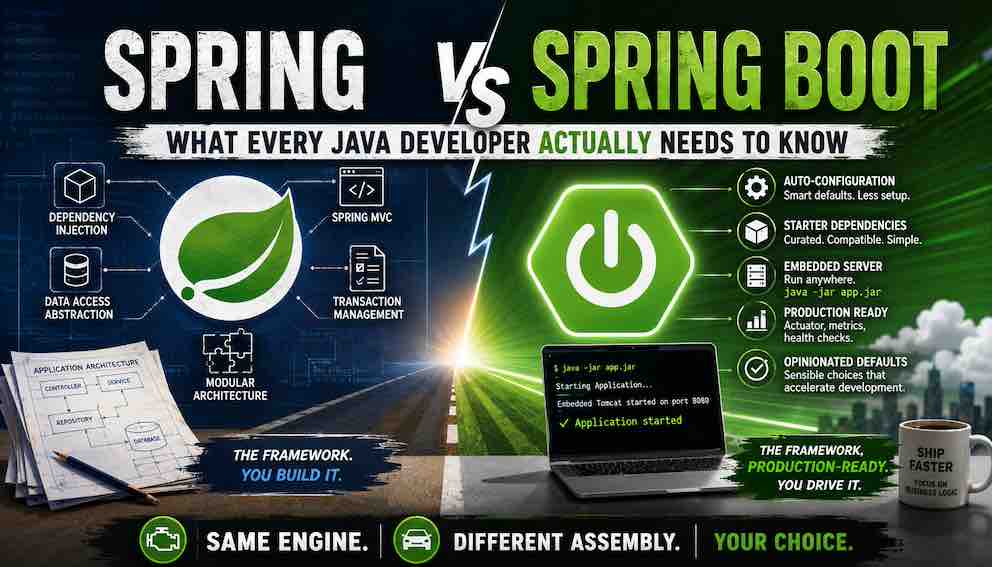
Spring Framework is a comprehensive Java application platform that has powered enterprise development for over two decades. Spring Boot is the ecosystem that makes it production-ready from day one — handling configuration, dependency management, testing, and operations so you can focus on writing application code. They are not alternatives: Spring Boot builds on Spring Framework and cannot exist without it. Understanding the distinction will change how you architect, debug, and learn Java applications.
What Spring Framework Actually Is
Spring Framework exists to solve a problem every Java developer runs into: as applications grow, managing objects — creating them, connecting them, controlling when they live and die — becomes the work, crowding out the actual business logic you are there to write.
Spring takes that burden off you entirely. You write plain Java classes. Spring creates them, wires them together, and manages their lifecycle inside a runtime container called the ApplicationContext. Need a service class inside a controller? Declare it, and Spring provides it. Need a repository inside a service? Same thing. The objects in your application stop worrying about finding each other and start focusing on what they are actually supposed to do.
This is dependency injection — and it changes not just how you write code, but how readable and testable that code becomes. Classes with injected dependencies are easy to test in isolation, because you can substitute real implementations with test doubles without changing a line of production code. This was a significant shift from what came before.
That same model — declare what you need, Spring handles the wiring — extends consistently across the entire stack. Spring MVC for building REST APIs and web applications. Spring Data for database access, whether relational through JPA or document-based through MongoDB, Redis, or Elasticsearch. Spring Security for authentication, authorisation, and OAuth2. Declarative transaction management that works across any persistence technology with a single annotation. Caching, messaging, batch processing — all following the same consistent programming model.
The broader Spring ecosystem — Spring Batch, Spring Integration, Spring Cloud — extends this foundation further into specialised territory. But Spring Framework is the core that all of it is built on, and the reason any of it works the way it does.
Spring Framework defines how your application is structured and how its concerns are managed. What it does not define is how your application is packaged, configured, or run. That is the gap Spring Boot was built to fill.
The Problem Spring Boot Was Built to Solve
Spring Boot arrived in 2013 to address a specific and well-documented friction point: starting a new Spring project consumed significant time and effort before a single line of business logic was written.
XML configuration overhead. Every application required multiple XML files defining beans. A typical project accumulated 100–200 lines of XML just to configure a data source, transaction manager, entity manager factory, view resolver, and dispatcher servlet — pure infrastructure ceremony before any real work could begin.
Dependency version management. Matching compatible versions of Spring, Hibernate, Jackson, and Tomcat was manual and fragile. Spring 3.2.8 worked with Hibernate 4.3.5 but not Hibernate 5. Jackson 2.4 worked, but 2.5 broke things. Teams spent hours reading release notes to find stable combinations before writing any application code.
External deployment complexity. Applications were packaged as WAR files and deployed to an external Tomcat, WebLogic, or JBoss installation. Each server environment required its own setup and maintenance. Deployment meant coordinating file copies, server configuration, and restarts across environments.
A new Spring project could consume days or even weeks of configuration work before meaningful development began. Spring Boot compressed that to under a minute — and in doing so, rethought what a Java application framework should provide.
What Spring Boot Actually Adds
Spring Boot is more than a configuration shortcut. It adds capabilities that cover the full journey — from writing code and running tests to deploying and operating your application in production. Here is what that looks like in practice.
Auto-Configuration and Boilerplate Reduction
Before Spring Boot, you were the assembler. Every component had to be declared, every integration point wired by hand, every standard piece of infrastructure configured explicitly. The framework gave you the parts; you were responsible for building the machine. Setting up a data source meant defining a DataSource bean, a TransactionManager, an EntityManagerFactory, and wiring them all together — before writing a single line of business logic. Registering a web layer meant configuring a DispatcherServlet in web.xml, declaring a ViewResolver, and enabling MVC support explicitly. Every new project started with hundreds of lines of infrastructure code that had nothing to do with the problem you were actually trying to solve.
Spring Boot changes that relationship fundamentally. Instead of waiting for you to configure everything explicitly, Boot observes what you have on your classpath — the libraries you have chosen to include — and makes intelligent inferences about what you intend. You added an H2 dependency, so Boot configures an in-memory database. You added Spring MVC, so Boot registers a web layer and wires up JSON serialisation. You added Spring Security, so Boot applies a sensible baseline security configuration. The framework meets you where you are.
The result is that you only write configuration that is specific to your application. Everything standard is already handled.
Technically, this works through conditional logic: each auto-configuration class only activates when specific conditions are met — a particular class is on the classpath, a particular bean has not already been defined, or a particular property has been set. If you define your own DataSource bean, Boot steps back and leaves yours in place. The convention yields to your intent the moment you express one.
Starter Dependencies
Building a Spring application before Boot meant assembling your own dependency list — and that list was longer and more fragile than it sounds. To build a web application you needed Spring MVC, a JSON library, an embedded server, a validation library, and the correct versions of all of them. Not approximately correct versions. Exactly compatible versions. Spring 3.2.8 worked with Hibernate 4.3.5 but silently broke with 4.3.6. Jackson 2.4 was fine; 2.5 was not. Every new project began with a research exercise: reading release notes, checking compatibility matrices, and hoping you had not missed a transitive conflict buried three levels deep in your dependency tree. When something broke at runtime — a ClassNotFoundException at two in the morning, a subtle serialisation failure in production — version mismatches were always on the suspect list.
Beyond the conflicts, the dependency list itself became a cognitive burden. A pom.xml with forty individually versioned entries told you very little about what the application actually did. The signal was buried in the noise.
Starters solve this at the root. A starter is a single, intentional dependency that represents a capability — not a library, but a coherent piece of what your application needs. Add spring-boot-starter-web and you get Spring MVC, Jackson, an embedded Tomcat, and validation, all at versions that are guaranteed to work together. Add spring-boot-starter-data-jpa and you get Hibernate, Spring Data JPA, and HikariCP connection pooling. Add spring-boot-starter-security and a complete, working security configuration is in place. The dependency list now reads like a description of your application's capabilities, because that is exactly what it is.
You never specify library versions. Spring Boot's Bill of Materials (BOM) handles all version compatibility for you.
Embedded Web Server
Spring Boot bundles the web server directly inside your application. Tomcat, Jetty, or Undertow starts when your application starts. The result is a single executable JAR that you run with java -jar app.jar. No external server installation. No WAR assembly. No environment-specific server configuration. This model made Spring Boot a natural fit for Docker, Kubernetes, and cloud-native deployments.
Properties and Configuration Management
Configuration management is one of Spring Boot's most valuable additions to the Spring ecosystem. Boot resolves properties from more than a dozen sources — command-line arguments, environment variables, application.yml, and profile-specific files — in a well-defined priority order. The same JAR runs correctly across development, staging, and production without touching a line of code. You change what is injected from outside; the application itself stays unchanged.
Spring Framework provides the @Value annotation for injecting individual configuration values into your beans — useful for simple cases, but it does not scale well. As configuration grows — database settings, API keys, feature flags, timeout values — scattering @Value annotations across dozens of classes becomes difficult to track and impossible to validate. Spring Boot goes further with @ConfigurationProperties, which binds an entire block of related configuration to a single, strongly-typed Java class. Your database configuration becomes a DatabaseProperties class. Your email settings become an EmailProperties class. Each is validated on startup, navigable in your IDE, and refactorable like any other code. Configuration stops being a collection of string keys scattered across the codebase and becomes a first-class part of your application's structure.
Profile-based configuration files — application-dev.yml, application-prod.yml, application-test.yml — are loaded automatically based on the active profile. Boot also applies relaxed environment variable binding, so SPRING_DATASOURCE_URL maps automatically to spring.datasource.url. This is what makes Boot applications genuinely cloud-native: Kubernetes ConfigMaps and secrets drop straight in with no additional wiring. Since Boot 2.4, spring.config.import extends this further, letting you pull configuration from external sources like HashiCorp Vault and AWS Parameter Store with minimal setup.
Testing Support
Boot ships a dedicated testing library — spring-boot-test — that has no equivalent in raw Spring. Its most powerful feature is test slicing: loading only the portion of the application context relevant to your test, keeping test suites fast and focused.
@WebMvcTest loads only the web layer — controllers, filters, and MVC configuration — without touching the database or service layer. @DataJpaTest loads only the JPA layer with an in-memory database, isolating persistence tests completely. @RestClientTest focuses on HTTP client behaviour. @JsonTest isolates JSON serialisation. For full integration tests, @SpringBootTest loads the complete application context with a single annotation.
In raw Spring, equivalent test setups require verbose manual context configuration. Boot's test slices remove that overhead entirely, making it practical to write fast, isolated, meaningful tests at every layer of your application without fighting the framework to do so.
Spring Boot's testing support goes considerably deeper than what is covered here — including mocking, test configuration, test containers, and more. We will cover it in depth in a dedicated article.
The Boot-Exclusive Ecosystem
Several libraries and capabilities exist exclusively within the Spring Boot ecosystem and have no equivalent in raw Spring.
Spring Boot Actuator exposes operational endpoints that provide real-time insight into your running application. /health reports application status. /metrics exposes performance data. /beans lists every bean in the context. /conditions shows exactly which auto-configurations were applied, which were skipped, and why — an invaluable diagnostic tool when Boot's behaviour is not what you expected.
Observability — Boot 3 brought first-class observability through Micrometer, a vendor-neutral metrics and tracing facade. Add the right starter and your application gains metrics exportable to Prometheus, Datadog, CloudWatch, and other platforms with no additional wiring. Micrometer Tracing adds distributed tracing with automatic trace and span ID injection into logs, making it straightforward to follow a single request as it moves across multiple services. What would be a meaningful engineering project in raw Spring is a starter dependency and a few properties in Boot.
Spring Boot DevTools speeds up day-to-day development. Change a file and your application restarts automatically. Update a template and the browser refreshes instantly. Development-time caches are disabled so you always see your latest changes. None of this requires any configuration.
Failure Analysers intercept startup exceptions and produce human-readable diagnostics with suggested fixes. Instead of a stack trace, you see: "The Tomcat connector configured to listen on port 8080 failed to start. The port may already be in use. Action: Identify and stop the process listening on port 8080." This dramatically reduces time spent on common startup problems.
Graceful Shutdown is available with a single property: server.shutdown=graceful. Boot drains in-flight requests before stopping the embedded server — behaviour that would require significant custom code to replicate in raw Spring.
Spring Initializr at start.spring.io generates a ready-to-run project with your chosen starters in seconds. It is the practical starting point for almost every Boot project and the fastest path from idea to running code in the Java ecosystem.
Opinionated Defaults
Boot makes sensible choices so you do not have to: Logback for logging, Jackson for JSON serialisation, Tomcat as the web server, HikariCP for connection pooling, port 8080 for HTTP. These defaults eliminate low-value decisions and let you focus on your application from the first line of code. When your requirements call for different choices, Boot makes those overrides possible — it just requires understanding the abstraction well enough to know where to intervene.
How Spring Boot and Spring Framework Work Together
The most important thing to understand about these two technologies is that Spring Boot builds on Spring Framework — it does not replace it.
Inside every Spring Boot application, Spring Framework runs exactly as it always has. The ApplicationContext manages every bean. Spring MVC handles every web request. @Transactional manages every database transaction. @Autowired wires every dependency. Every module of Spring Framework — Security, Data, AOP, and the rest — runs unchanged beneath Boot's surface.
Spring Boot does not replace a single Spring module. It configures them, wires them together, manages their versions, and provides defaults for their behaviour.
Without Spring Framework, Spring Boot has nothing to configure. Without Spring Boot, Spring Framework continues working exactly as it has since 2003. The dependency runs in only one direction.
Spring Framework vs Spring Boot: Quick Reference
- Configuring beans? Spring Framework: explicit, via XML or @Configuration. Spring Boot: automatic, via classpath detection.
- Managing dependencies? Spring Framework: you select and verify versions manually. Spring Boot: starters and the BOM handle compatibility for you.
- Deploying? Spring Framework: WAR to an external server. Spring Boot: executable JAR with java -jar.
- Managing configuration? Spring Framework: properties injected one value at a time via @Value, with @Profile for conditional bean loading but no automatic file-based profile resolution. Spring Boot: a layered configuration system that automatically loads profile-specific files (application-dev.yml, application-prod.yml), resolves properties from environment variables, YAML, and command-line arguments in a defined order — with @ConfigurationProperties for binding entire configuration blocks to typed, validated Java classes.
- Testing? Spring Framework: manual context setup. Spring Boot: surgical test slices with a single annotation.
- Observability? Spring Framework: manual wiring. Spring Boot: metrics and distributed tracing with a starter and a few properties.
- Operations? Spring Framework: build it yourself. Spring Boot: Actuator, graceful shutdown, and failure diagnostics included.
- Relationship? Spring Boot is a superset — everything Spring Framework does, Boot also does, with a complete productivity and operational ecosystem on top.
Trade-offs Worth Understanding
Auto-configuration genuinely accelerates development. Like any powerful abstraction, it involves trade-offs worth knowing before you encounter them.
Understanding what runs behind the scenes. Spring Boot ships with over 150 auto-configuration classes. At startup, those relevant to your classpath are evaluated — each checking conditions to decide whether to activate. When something behaves unexpectedly, you are tracing that conditional logic rather than explicit configuration you wrote yourself. The /conditions Actuator endpoint helps significantly here — it shows exactly which auto-configurations were applied and which were skipped — but it requires knowing to look there.
A practical example: you define a custom DataSource bean for a multi-tenant setup. Boot's DataSourceAutoConfiguration also creates a DataSource bean. Depending on context load order, yours may be silently overridden, or the application may throw a NoUniqueBeanDefinitionException at startup. The fix — annotating your bean with @Primary or excluding DataSourceAutoConfiguration — is straightforward once you understand @ConditionalOnMissingBean. Reaching that understanding is the investment Boot asks of you.
Startup time and memory footprint. At startup, Boot evaluates all auto-configuration classes relevant to your classpath — the majority check their conditions and step aside, but the evaluation itself adds overhead. A raw Spring application loading only explicitly configured beans starts meaningfully faster and uses less memory. For most web applications this is an acceptable trade-off. For serverless functions or edge workloads where cold-start time is critical, it is worth evaluating carefully.
Customising defaults requires understanding the abstraction. Switching from Tomcat to Jetty, or Logback to Log4j2, means knowing which auto-configuration classes to exclude and which starter dependencies to swap. The convention-over-configuration model rewards developers who invest time in understanding what Boot is doing on their behalf.
When to Use Spring Boot
Spring Boot is the right default choice for the overwhelming majority of Java applications built today. REST APIs, microservices, cloud-native applications, internal enterprise systems, event-driven services — Boot is well-suited to all of them. If you are building something service-oriented and do not have specific constraints pushing against its conventions, the productivity and operational gains are significant enough that reaching for Boot requires no justification.
Starting a new project? Use start.spring.io, select your starters, and be writing business logic within minutes.
When Raw Spring Is the Better Fit
Raw Spring is the better choice in a handful of specific situations. These are genuine edge cases for most teams, but knowing them helps you make deliberate choices.
Learning Spring fundamentals. Boot abstracts the ApplicationContext, bean lifecycles, dependency injection mechanics, and the full configuration model. Working without Boot first forces you to understand what is actually happening underneath — which makes Boot feel like a helpful assistant rather than an opaque system when you return to it. If you are new to Spring, the learning sequence matters.
Lightweight tools and batch jobs. A command-line utility, a data transformation pipeline, or a scheduled batch processor does not need an embedded web server, Actuator endpoints, or the full Boot dependency graph. Raw Spring with only the modules your application actually needs produces a dramatically smaller and faster artefact.
Extreme cold-start performance requirements. Serverless functions and edge workloads where every millisecond of startup time matters may benefit from the leaner profile of explicitly configured Spring. Boot's auto-configuration evaluation adds startup overhead that is difficult to eliminate entirely.
Highly specific infrastructure requirements. Some organisations have deployment pipelines, compliance requirements, or security review processes that call for explicit, auditable configuration control. Raw Spring gives you that directly, with no conventions to work around.
Summary
Spring Framework is a comprehensive Java application platform that has powered enterprise development for over two decades. It provides the container, the programming model, and the full capability stack — web, data, security, transactions, messaging, and more — that your application is built on.
Spring Boot is the ecosystem layer that makes Spring production-ready from day one. It eliminates manual configuration through intelligent auto-wiring, resolves dependency compatibility through curated starters, embeds the web server inside your application, and ships a complete operational toolkit — testing support, observability, health monitoring, graceful shutdown — that would take significant effort to assemble from scratch.
They are not alternatives. Spring Boot builds on Spring Framework and cannot exist without it. Every Spring Boot application is a Spring Framework application, with Boot handling the assembly so you can focus on the code that matters.
For the vast majority of Java applications built today, Spring Boot is the right starting point. Understanding Spring Framework beneath it makes you significantly more effective when you need to customise, debug, or reason about what your application is actually doing.
About N Sharma
Lead Architect at StackAndSystemN Sharma is a technologist with over 28 years of experience in software engineering, system architecture, and technology consulting. He holds a Bachelor’s degree in Engineering, a DBF, and an MBA. His work focuses on research-driven technology education—explaining software architecture, system design, and development practices through structured tutorials designed to help engineers build reliable, scalable systems.
Disclaimer
This article is for educational purposes only. Assistance from AI-powered generative tools was taken to format and improve language flow. While we strive for accuracy, this content may contain errors or omissions and should be independently verified.