
Learning Paths
Last Updated: May 22, 2026 at 14:00
Spring Boot Scheduling: @Scheduled, Cron Jobs, Thread Pools, and Distributed Locks
How Spring scheduling actually works — and what that means for the code you write
This article explains how Spring Boot scheduling works beyond the surface of @Scheduled, including how tasks are triggered, executed, and managed inside the JVM. It then builds a practical understanding of the hidden complexities that appear in production, such as thread behavior, overlapping executions, and missed schedules. You’ll learn why scheduling is less about timing and more about concurrency, reliability, and coordination across systems. By the end, you’ll have a clear mental model for designing scheduled jobs that behave predictably at scale.
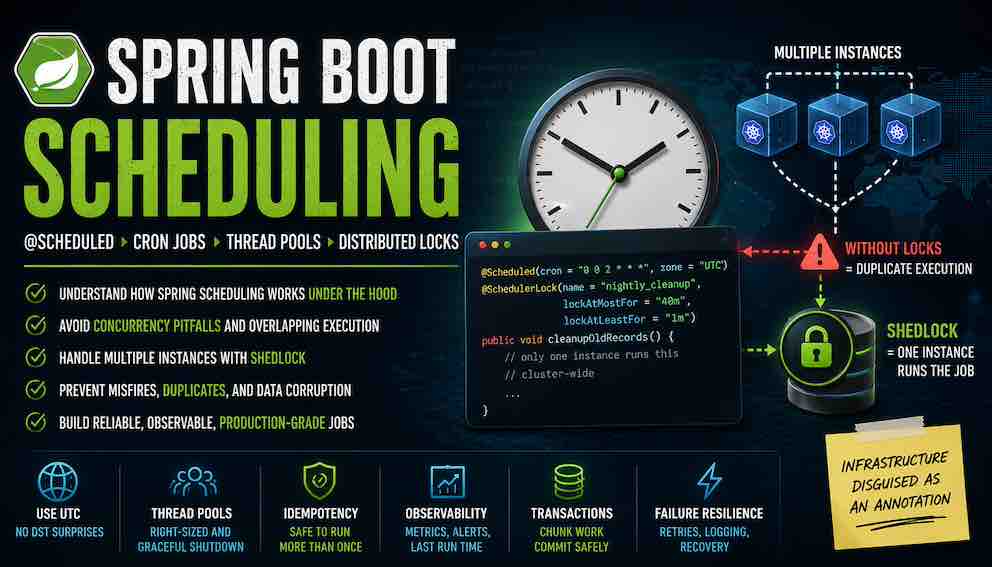
This article covers Spring Boot scheduling from the ground up — the mental model, the mechanics, the failure modes, and the decisions that matter when moving from a single instance to production at scale.
Introduction: What Scheduling Actually Is
A scheduler exists for one reason: some work needs to happen whether a user is present or not.
A scheduler is a mechanism that runs code at a defined time or interval, without a human or another system triggering it directly. It is the right tool whenever work needs to happen on a recurring basis — cleaning up stale records, sending digest emails, syncing data with an external system, running nightly reports. Instead of embedding that logic inside a request handler or a queue consumer, a scheduler owns the timing independently.
At first glance, schedulers appear simple. "Run this method every hour" sounds trivial. In production systems, however, scheduling quickly becomes a concurrency and coordination problem disguised as a timer.
Every scheduler is responsible for three distinct things. First, it tracks time and determines when a job should run. Second, it hands that job to a thread for execution. Third, it decides what happens when reality interferes — when the previous execution has not finished yet, when threads are exhausted, when the application is overloaded, or when multiple executions collide.
Most production scheduling issues trace back to one of those responsibilities being misunderstood.
Spring Boot's scheduler is intentionally minimal in scope. It is a local, in-process scheduler that lives entirely inside your JVM. It runs jobs using threads managed by your application and has no awareness of anything beyond that single process.
It does not know whether another instance of your application is running the same job. It does not persist scheduling state to a database. It does not coordinate execution across a cluster. When the JVM starts, the scheduler starts with it. When the JVM stops, the scheduler disappears with it.
Part 1: How Spring Boot Scheduling Actually Works
How @Scheduled Works Internally in Spring Boot
When you add @EnableScheduling to a configuration class, Spring Boot activates a post-processor called ScheduledAnnotationBeanPostProcessor. This class scans your application context during startup, looking for any bean method annotated with @Scheduled. When it finds one, it registers that method with a TaskScheduler.
Registration happens at startup time, not at runtime. This means two important things. First, you cannot add or remove scheduled jobs while the application is running without restarting. Second, cron expressions in @Scheduled annotations are evaluated at application startup and cannot be changed without restarting the application or using a dynamic scheduling mechanism built on Spring's TaskScheduler APIs.
The TaskScheduler receives a Runnable wrapper around your method and a Trigger that tells the scheduler when to run it. For cron expressions, Spring uses a CronTrigger. For fixed rate or fixed delay, it uses simpler interval-based triggers.
Spring Boot's Default Scheduler Uses One Thread
By default, Spring Boot uses a single-threaded scheduler unless a TaskScheduler bean is provided — either explicitly or through auto-configuration — in which case a thread pool-based scheduler is used instead. In a fresh Spring Boot application with no custom configuration, the default is effectively single-threaded.
If you have five scheduled methods, they all share that single thread. If one job runs long, the others queue behind it. Spring's default behaviour is conservative by design — a single thread means no concurrent execution of scheduled jobs, which keeps the execution model simple and predictable.
But a single thread has capacity limits. Consider a batch job that runs at 2 AM and takes eight minutes. While it runs, a heartbeat job scheduled every minute cannot execute. When the batch job finally finishes, delayed executions may run back-to-back as the scheduler catches up with the intended schedule, creating a burst of work for downstream systems.
This creates scheduler backlog and execution delays. A single-thread scheduler is appropriate for simple applications; for production systems with multiple jobs or variable execution times, a configured thread pool is the right starting point.
Part 2: Understanding Every Scheduling Mode
Spring Boot gives you four ways to control when a scheduled method runs. Each behaves differently, and understanding the distinction matters for choosing the right one.
Fixed Delay
Fixed delay measures time from the end of one execution to the start of the next. If your job takes three seconds and you set a five-second delay, executions start every eight seconds. With a standard single-thread scheduler, fixed delay naturally serialises executions because the delay is measured after completion — only one execution runs at a time, regardless of how long the job takes.
Fixed Rate
Fixed rate scheduling attempts to maintain a constant start interval. With a single-thread scheduler, a six-second job scheduled every five seconds cannot truly overlap — the thread is busy. Instead, the second execution queues and runs the moment the first finishes, creating back-to-back executions rather than the intended interval. With a thread pool, executions are scheduled independently and can run concurrently — overlap is real, not just theoretical, and introduces thread-safety concerns for any shared state.
Initial Delay
Initial delay postpones the first execution. This is useful when your job depends on infrastructure that takes time to start — database connection pools, message brokers, caches. Without an initial delay, a job might run before the application is fully ready and fail immediately.
Cron Expressions
Cron expressions give you the most control. Spring uses a six-field format: second minute hour day-of-month month day-of-week. The leading seconds field is the most important difference from standard Unix cron.
Some common patterns:
- Every minute: "0 * * * * *" — note the leading zero. Without it, the job runs every second of every minute.
- Every five minutes: "0 */5 * * * *"
- At 2:30 AM every day: "0 30 2 * * *"
- Weekdays at midnight: "0 0 0 * * MON-FRI"
Using Properties as Scheduling Arguments
All four scheduling modes — cron, fixedDelay, fixedRate, and initialDelay — accept Spring property placeholders. This allows scheduling configuration to live in application.properties or application.yml and vary across environments without code changes.
Note that fixedDelay, fixedRate, and initialDelay accept long values directly, while their String counterparts (fixedDelayString, fixedRateString, initialDelayString) are needed when using property placeholders or ISO-8601 duration strings such as PT30S.
With this in place, a development environment can poll every thirty seconds while production runs every five minutes, with no conditional logic in the code itself.
Time Zones, UTC, and Daylight Saving Bugs
By default, Spring uses the system time zone of the server running your application. In cloud environments with containers spread across regions, this requires attention.
When clocks spring forward, the hour from 2:00 AM to 3:00 AM disappears. A job scheduled at 2:30 AM never runs that day. When clocks fall back, the hour repeats. The job runs twice. In a Kubernetes cluster with nodes across regions, pods may disagree on what time it is entirely.
The fix is simple and absolute: always specify UTC.
UTC has no daylight saving time. A 2 AM UTC job runs at the same instant everywhere on earth, regardless of where your containers are running.
Note: All code examples in this article are written for illustration purposes and have not been tested or validated in a running application. They are intended to convey concepts and structure, not to be copied directly into production.
Part 3: Concurrency, Threads, and Overlapping Execution
What Happens When a Job Takes Longer Than Its Interval
Imagine a fixed-rate job scheduled every sixty seconds. One day, your database slows down, and the job takes three minutes. With the default single-thread scheduler, the second execution queues at sixty seconds. A third queues at two minutes. When the first finally finishes, the queued executions run immediately in a burst.
Downstream systems receive three rapid requests in succession. Connection pools come under pressure. API rate limits may be reached. By the time the system recovers, the burst has already passed, which can make it hard to observe after the fact.
This pattern is called execution pileup. The right mitigation depends on the job, but a combination of a properly sized thread pool, bounded execution time, and idempotent operations covers most cases.
Configuring a Custom Scheduler Thread Pool
This gives you ten threads, so ten concurrent scheduled jobs can run without blocking each other. The thread name prefix helps enormously with log filtering — when you see app-scheduler-3 in your logs, you know exactly which thread was running.
The setAwaitTerminationSeconds and setWaitForTasksToCompleteOnShutdown settings are easy to overlook but important in production. They tell Spring to wait up to sixty seconds for running jobs to finish when the application shuts down. Without them, jobs may be interrupted during pod termination if the shutdown process completes before the work finishes.
Sometimes you want a multi-thread pool for scheduling but still need a specific job to run one at a time. @Async changes where the work runs but does not prevent concurrent execution of the same scheduled method — what you need is either fixed delay (which naturally serialises executions) or an explicit lock using synchronized, a semaphore, or a database-level mechanism like ShedLock.
When using fixed rate with a multi-thread pool and stateful code, synchronisation needs to be considered explicitly to keep concurrent executions consistent.
Using @Async with @Scheduled
A common pattern developers reach for when a scheduled job is slow is combining @Async with @Scheduled. The idea is that the scheduler thread fires the job on schedule, but the actual work runs on a separate async executor thread, freeing the scheduler immediately.
This works, but it changes how backpressure is handled in a way worth understanding.
With a normal scheduled job, if the job takes longer than its interval, executions queue behind the scheduler thread. The queue acts as natural backpressure — the system slows down rather than piling up unbounded work. With @Async, each scheduled trigger immediately submits a new task to the async executor pool. If the async executor is configured with an unbounded queue and the job consistently takes longer than its interval, tasks can accumulate faster than they are processed, eventually exhausting memory or saturating the thread pool.
The pattern works well when the async pool is bounded and the job's average execution time is reliably shorter than its interval. If either of those assumptions does not hold, a different approach is worth considering: use fixedDelay instead of fixedRate (which naturally prevents overlap without @Async), or implement an explicit semaphore that causes new invocations to skip rather than queue if the previous one is still running.
Also note that @Async requires @EnableAsync on a configuration class, and it only works through the Spring proxy — calling an @Async method from within the same bean bypasses the proxy and runs synchronously.
Part 4: Scheduled Jobs in Distributed Systems
Why Scheduled Jobs Run Multiple Times in Kubernetes
Kubernetes runs replicas of your application for high availability. If you have three replicas, you have three separate JVMs, each with its own Spring scheduler, each reading the same @Scheduled annotations, each running jobs independently.
With a cron job scheduled at 2 AM, each instance independently attempts to run the job at that time. This is not a bug in Spring or in Kubernetes. Spring's scheduler is a local scheduler — it runs methods on time and has no awareness of other instances, no coordination mechanism, and no concept of a cluster.
What Happens to Scheduled Jobs During Deployments
Rolling deployments introduce another category of problem. Your job starts at 2 AM on an old pod. At 2:05 AM, Kubernetes sends a SIGTERM to that pod as part of the rollout. The job is interrupted mid-execution. A new pod, unaware the job has partially run, sees the scheduled time and runs it again.
This is why graceful shutdown configuration matters. It gives running jobs time to finish before the pod terminates. But graceful shutdown alone is not enough — a deployment that overlaps with the job window can still produce duplicates. Layering idempotency and distributed locks on top of graceful shutdown gives you defence in depth.
What Spring Boot Scheduling Does NOT Guarantee
To be explicit about Spring scheduling's boundaries: it does not guarantee exactly-once execution across a cluster. It does not prevent duplicate execution. It does not coordinate start times across instances. It does not persist job state across restarts. It does not elect a leader.
If you need any of these properties, you must add a distributed coordination layer yourself.
What Happens When the Application Is Down During a Scheduled Time
Spring scheduling does not persist execution state anywhere. If your application is offline when a cron trigger occurs, that execution is simply lost.
Consider a job scheduled at 2 AM. The application goes down at 1:55 AM due to a deployment or crash, and comes back up at 2:10 AM. The 2 AM execution does not run retroactively. Spring simply calculates the next future execution time from the current moment and waits for it.
This is called a misfire. Quartz, the more fully-featured scheduling library, provides configurable misfire policies that define whether missed executions should be run immediately, skipped, or rescheduled — with the exact options depending on the trigger type. Spring's default scheduler has no equivalent concept. It simply calculates the next future execution time from the current moment and waits for it.
For jobs where a missed execution has real business consequences — a billing run, a report that stakeholders depend on — this is an important architectural gap. The mitigation options are: use Quartz for durable scheduling, use Kubernetes CronJobs which the infrastructure will reschedule independently, or add startup logic that detects a missed execution and runs any catch-up work explicitly.
Part 5: Preventing Duplicate Execution with ShedLock
ShedLock is the most common solution for Spring's distributed scheduling problem. It does not replace Spring's scheduler — it adds a coordination layer that prevents the same job from running on multiple instances simultaneously.
The idea is simple. Before a scheduled job runs, the instance tries to acquire a lock in a shared store. If it gets the lock, it runs the job. If another instance already holds the lock, this instance skips execution. After the job finishes, the lock is released.
ShedLock supports a wide range of backing stores, so it works with whatever your application already uses. SQL databases (PostgreSQL, MySQL, Oracle, and others) are supported via JDBC. MongoDB, Redis, DynamoDB, Cassandra, Elasticsearch, and ZooKeeper are also supported through their respective provider modules. The locking mechanism is the same regardless of the store — only the dependency and configuration differ.
How ShedLock Works Internally
ShedLock stores locks using four fields: a lock name (which job), a lock owner (which instance), a locked_at timestamp, and a lock_until timestamp. The expiry is the critical detail. If an instance acquires a lock and then crashes, its lock would block all other instances forever. ShedLock prevents this by setting a lease time — the lock automatically expires after a configurable duration even if the holding instance never releases it.
This creates an important constraint: if a job runs longer than its lease time, the lock expires while the job is still running. Another instance can then acquire the lock and start a duplicate execution. The rule is simple: set your lock lease time to cover the maximum possible execution time, not the average. If your job normally takes ten minutes but could take thirty during a database backup, set the lease to forty minutes.
There is a subtler operational concern here: clock drift. By default, ShedLock computes the lock_until timestamp on the application instance and writes it to the database. If two instances have drifted clocks, they may disagree on when a lock has expired. ShedLock addresses this with a usingDbTime() option, which delegates timestamp generation to the database itself — so all instances work from the same clock regardless of their own system time:
Clock drift is rarely a major issue in modern cloud environments due to NTP synchronisation, but usingDbTime() is a simple hardening option worth enabling — it removes any dependency on application node clocks and makes lock expiry fully consistent across instances regardless of their system time.
Setting Up ShedLock with JDBC
The examples below use the JDBC provider, which covers PostgreSQL, MySQL, Oracle, and any other SQL database. For other stores, replace the provider dependency and LockProvider bean — the @SchedulerLock annotation on your methods stays the same regardless.
Add the dependencies:
Create the lock table. ShedLock requires this table to exist before it can acquire or release locks:
Configure Spring to use ShedLock:
Annotate your scheduled methods:
lockAtMostFor is the safety net — the lock expires after this duration even if the instance crashes. lockAtLeastFor prevents a fast-finishing job from releasing its lock so quickly that another instance grabs it before the original trigger window has fully passed. Both values should be tuned to the actual characteristics of your job.
Scheduler Locking Is Not Database Locking
This distinction is critical and widely misunderstood.
ShedLock prevents duplicate scheduler execution across multiple application instances. That is all it does. It does not protect database rows from concurrent access within a single execution. It does not handle lost writes. It does not replace transactions.
Two different scheduled jobs, each with their own ShedLock, updating the same database table will not be protected from each other. One job could read a row while another is updating it. Distributed scheduler locking coordinates timing. You still need proper database transactions, optimistic locking, and appropriate isolation levels to protect your data.
Part 6: Transactions, Security, and Application Context
What Scheduled Jobs Have Access To
A scheduled job is a Spring bean method. It has access to everything any other bean has — repositories, services, transaction managers, REST clients, message queues, configuration properties. If you can inject it, you can use it.
What Scheduled Jobs Do Not Have Access To
Scheduled jobs run outside any HTTP request context. They have no request-scoped beans, no authenticated user, no HTTP session, and no security context from a browser session.
If your job needs to act as a specific user — for example, to trigger an operation that checks permissions — you must set up the security context explicitly within the job using SecurityContextHolder. Most teams use a dedicated technical service account for this, scoped with only the permissions that specific job needs.
Using Transactions Safely Inside Scheduled Jobs
The @Transactional annotation works inside scheduled jobs. One behaviour worth understanding up front:
This looks fine until there are ten thousand pending orders. The transaction opens, loads everything into memory, processes each order one by one, and commits at the end. Beyond the rollback risk if a single order fails, a long-running transaction holds database locks for its entire duration, increasing contention and reducing throughput for anything else touching the same rows.
The solution is to chunk your work. Process batches of one hundred orders in separate transactions:
Chunking also improves resilience to pod restarts. Completed batches are already committed; a restart only loses the current batch, not all progress.
Note that @Transactional on a @Scheduled method requires a proxy, which means the method must be called through the Spring bean, not this. If you call processBatch from processPendingOrders in the same class, the @Transactional annotation on processBatch will not take effect unless you inject self or move the batch method to a separate bean.
Part 7: Failure Handling and Reliability
What Happens When a Scheduled Job Throws an Exception
When a scheduled method throws an unchecked exception, Spring logs it and moves on to the next scheduled execution. The job does not retry. It does not raise an alert. It simply does not run again until its next scheduled time.
This behaviour means that exception handling needs to be deliberate. Without it, a job that starts failing at 2 AM may not surface until much later when someone notices the expected outcome is missing.
Handle exceptions explicitly in scheduled jobs. Log with enough context to debug. Publish failure metrics to your monitoring system. For transient failures — network timeouts, temporary database unavailability — consider a retry library like Spring Retry or Resilience4j rather than re-implementing retry logic yourself.
Designing for Duplicate Execution
In distributed systems, a job can run more than once. Networks partition. Locks expire. Pods restart mid-execution. Designing around this is more practical than trying to prevent it.
The concept to reach for is idempotency: an operation that produces the same result whether it runs once or ten times. If your job charges a credit card, it should check whether the charge already happened before proceeding. If it sends an email, it should track which emails have already been sent.
Idempotency keys are the standard implementation pattern — store a unique identifier for each unit of work before processing it, and skip any work whose identifier is already recorded:
A database table with a unique constraint works equally well for persistence across restarts. The choice between Redis and a database table usually comes down to whether the idempotency record needs to survive an application restart.
Monitoring and Observability
Observability is what makes scheduled jobs maintainable over time. Every scheduled job should expose execution count, success count, failure count, duration, and last execution time.
Spring Boot Actuator provides some metrics automatically, but business-critical jobs need custom instrumentation:
Feed these metrics into dashboards and alerts. A spike in failure count is an early signal worth acting on. A duration that trends upward over weeks indicates performance degradation. A job where "last execution time" drifts further into the past is one that has quietly stopped running.
Part 8: When Spring Scheduling Is the Wrong Tool
When @Scheduled Stops Being Enough
Spring scheduling works well for simple, periodic, single-node-safe jobs. It starts to struggle when your requirements include any of the following.
Durable execution across restarts. Spring scheduling holds all job state in memory. If the application restarts, it has no knowledge of which jobs ran and which did not. If a 2 AM job starts, the application crashes at 2:05 AM, and the pod restarts at 2:10 AM, the job simply does not run again until 2 AM the next day. For critical jobs, this is unacceptable.
Parallel processing of large datasets. Spring scheduling does not provide distributed parallelism, checkpointing, or workload partitioning. If a job processes ninety percent of a dataset and then fails, it starts over from zero on the next run.
Complex retry logic. Spring's scheduler does not retry failed jobs. If a transient failure causes an exception, the job waits for its next scheduled window. Implementing sophisticated retry with backoff and dead-letter handling is better served by a dedicated library or a different scheduling mechanism.
Multi-step workflow orchestration. If a job needs to coordinate multiple steps across different services — notify a user, then update a record, then call an external API — tracking state across those steps requires infrastructure that @Scheduled does not provide.
Choosing the Right Tool
Quartz adds a persistent store to the scheduler. Jobs, triggers, and execution state are saved to a database. If the application restarts, Quartz knows what ran and what did not. It also supports clustering natively, using the database as a coordination mechanism. Quartz is a heavier dependency than ShedLock but appropriate when durability is the primary requirement.
Kubernetes CronJobs run scheduled work as separate pods, completely isolated from your main application. A failed job does not affect your main service. The trade-off is that Kubernetes CronJobs cannot share in-process state, caches, or Spring beans with your application. They suit container-native workloads that need infrastructure-level scheduling.
Message queues with delayed delivery (RabbitMQ, Amazon SQS with delay, Redis Streams) invert the polling model. Instead of a cron job that asks "is there work to do?", work is pushed onto a queue with a delivery delay. Workers process the queue. Scaling is natural — add more workers. Retry is built in — failed messages return to the queue. This pattern suits high-throughput or variable-volume workloads poorly served by fixed intervals.
Temporal and similar workflow engines provide durable execution, automatic retries, versioning, and end-to-end visibility into long-running business processes. They are significant operational overhead for simple batch jobs, but essential for workflows spanning hours or days across multiple services.
Spring scheduling is the right choice for simple, idempotent, tolerant jobs. When requirements grow beyond those constraints, the alternatives below are worth evaluating.
Part 9: Production Checklist
Every production scheduled job should satisfy these properties before going live.
Specify UTC explicitly. Add zone = "UTC" to every @Scheduled cron expression. This keeps behaviour consistent across regions and removes daylight saving time as a variable.
Configure a thread pool. The default single thread suits simple applications. In production, configure a ThreadPoolTaskScheduler with a pool sized to your job count and profile, and set graceful shutdown parameters.
Make every job idempotent. Design operations to be safe when run multiple times. Use idempotency keys. Duplicate executions are a normal part of distributed systems.
Add ShedLock for multi-instance deployments. If your application runs more than one instance, use ShedLock or an equivalent distributed lock. Set lockAtMostFor to cover the worst-case execution time of your job.
Understand the difference between scheduler locking and database locking. ShedLock prevents duplicate execution across instances. It does not protect data from concurrent access within a single execution. Proper transactions and isolation levels handle that separately.
Handle exceptions explicitly. Log structured context. Emit failure metrics. Spring moves on to the next execution after an exception without retrying — explicit handling is what surfaces problems early.
Chunk large batches. Process work in smaller transactions that commit independently. This improves resilience to restarts and avoids loading large datasets into memory at once.
Instrument every job. Expose duration, success count, failure count, and last execution time. Set up alerts on failure rate changes and on last execution time falling behind.
Test your schedule logic. Write integration tests that verify cron expressions trigger at expected times. Write unit tests that verify idempotency holds under repeated calls. Include tests that simulate failures and check recovery behaviour.
Understand misfire behaviour. If the application is down when a scheduled trigger fires, Spring will not run it retroactively. For business-critical jobs, decide explicitly whether a missed execution is acceptable or whether Quartz, Kubernetes CronJobs, or startup catch-up logic is needed.
Monitor clock synchronisation in distributed lock environments. If you use ShedLock, configure usingDbTime() on the JdbcTemplateLockProvider so that lock expiry timestamps are generated by the database rather than individual application instances. This removes clock drift between servers as a variable.
Configure graceful shutdown. Set setWaitForTasksToCompleteOnShutdown(true) and setAwaitTerminationSeconds so that SIGTERM from Kubernetes allows running jobs to finish. Coordinate this with your pod's terminationGracePeriodSeconds.
Conclusion: Infrastructure Disguised as an Annotation
The @Scheduled annotation is one of Spring Boot's most concise features. It works well in development and scales predictably when its design boundaries are understood.
What matters in production is rarely syntax. It is concurrency, distributed coordination, partial failure, and operational visibility. A single-threaded default scheduler that queues work under load. A cron implementation tied to system time zones. No built-in cross-JVM coordination. A distributed lock that coordinates execution timing but not data access. These are design decisions that make sense for a local, embedded scheduler, and they have clear, addressable implications at scale.
Once you understand those decisions, you can work with them deliberately. Configure thread pools for your actual workload. Lock time zones to UTC. Add ShedLock where instances compete for shared work. Design every operation to be idempotent. Instrument everything. Shut down gracefully.
Spring scheduling is infrastructure. Like all infrastructure, it is focused in scope and rewards understanding its design. The @Scheduled annotation is an invitation to think carefully — about concurrency, about failure handling, about what "exactly once" actually means in a world of pods, restarts, and rolling deployments.
Scheduling behaviour in production reflects how well the underlying model is understood. The annotation is the easy part.
About N Sharma
Lead Architect at StackAndSystemN Sharma is a technologist with over 28 years of experience in software engineering, system architecture, and technology consulting. He holds a Bachelor’s degree in Engineering, a DBF, and an MBA. His work focuses on research-driven technology education—explaining software architecture, system design, and development practices through structured tutorials designed to help engineers build reliable, scalable systems.
Disclaimer
This article is for educational purposes only. Assistance from AI-powered generative tools was taken to format and improve language flow. While we strive for accuracy, this content may contain errors or omissions and should be independently verified.