
Learning Paths
Last Updated: May 22, 2026 at 14:00
Spring Boot Profiles: The Complete Guide
How the same JAR runs correctly on a laptop, in CI, and in production
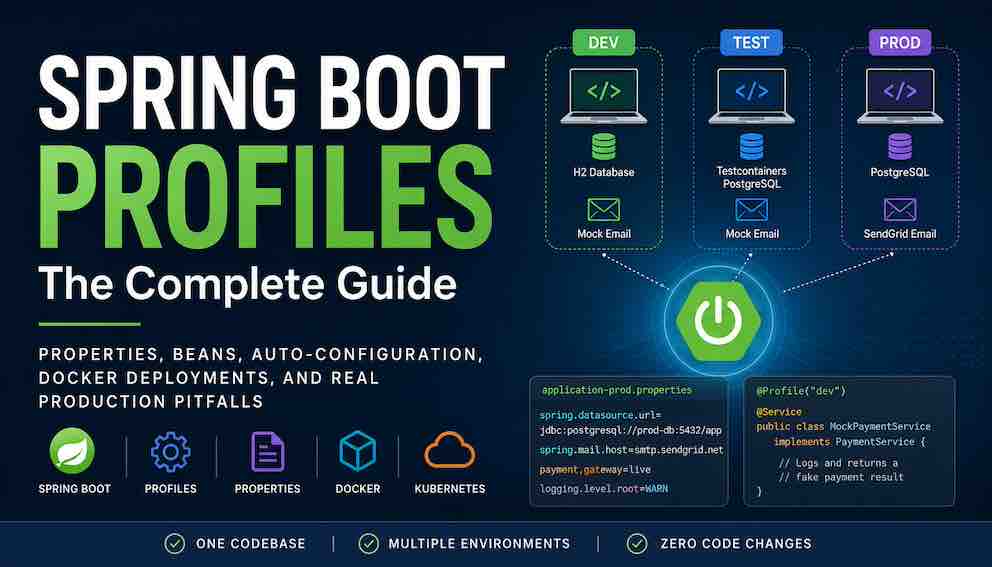
Spring Boot Profiles are the mechanism that lets the same application connect to PostgreSQL in production, H2 locally, and a test database in CI — without a single line of conditional logic in your code. This guide covers all four layers profiles operate across: bean loading, property files, auto-configuration, and external configuration source activation. It includes profile expressions, property precedence, profile groups, and Docker and Kubernetes deployment patterns. By the end you will have the full mental model to build, configure, and safely deploy environment-aware Spring Boot applications.
Part 1: What Spring Boot Profiles Actually Solve
A Spring Boot Profile is a named environment switch that changes how the same application behaves at runtime. You activate a profile at startup — via an environment variable, a command-line flag, or a property file — and Spring Boot uses that name to conditionally enable or disable:
- beans (@Profile)
- configuration properties (application-dev.properties, application-prod.properties)
- parts of auto-configuration
- and sometimes entire external infrastructure integrations
Think of it as a wiring diagram that gets swapped at startup. The code is identical. The classpath is identical. The JAR is identical. Only the active profile changes which components are wired together and which configuration values they receive. That is why the same artifact can connect to PostgreSQL in production but H2 locally, send real emails in production but only log them in development, and call a live payment gateway in production but use a mock in tests — with no conditional logic anywhere in the application code itself.
The Problem Profiles Solve: Environment Divergence
The same application gets deployed across multiple environments, each with different infrastructure, credentials, and behaviour requirements:
- a developer laptop — fast, local, with incomplete dependencies
- a CI pipeline — ephemeral, isolated, credential-limited
- a staging environment — production-like but safe
- a production system — real users, real money, real data
Each context requires slightly different behaviour. Without a clean mechanism to manage this, teams end up with if (env.equals("prod")) blocks scattered across business logic, commented-out configuration, separate branches per environment, or subtle configuration drift that only surfaces in production. All of these approaches eventually become fragile.
Spring Profiles solve this by introducing a clean boundary: one codebase, one build artifact, multiple runtime configurations.
A Minimal Example
Before looking at the details, here is the simplest possible illustration:
Run with --spring.profiles.active=prod and Spring creates RealPaymentService. Run with --spring.profiles.active=dev and Spring creates MockPaymentService. Everything else stays identical — same JAR, same codebase, same deployment artifact.
The Key Mental Model
If you take one thing from this guide, make it this:
Spring Profiles are a way to change the wiring of your application based on environment, without changing the application itself.
Everything else in this guide builds on that idea.
Part 2: The Four Layers of Spring Boot Profiles
Spring Boot Profiles operate across four distinct layers, each doing something meaningfully different. Missing any one of them leads to environment-specific bugs that are notoriously difficult to diagnose. Each layer is covered in depth with examples in the sections that follow.
Layer 1 — Conditional bean loading with @Profile Annotate a bean with @Profile and Spring only creates it when that profile is active. This is how you swap real services for mocks without any conditional logic in your business code.
Layer 2 — Environment-specific configuration properties Create application-prod.properties or application-dev.properties and Spring loads those properties only when the corresponding profile is active. Database URLs, API keys, and feature flags all change per environment without a single line of code changing.
Layer 3 — Profile-aware auto-configuration Spring Boot's built-in auto-configuration also responds to profiles. Some auto-configurations are intentionally suppressed for certain profiles — for example, preventing the real mail-sender from being auto-configured when the dev profile is active, so no real emails can be sent from a local environment regardless of what other code does.
Layer 4 — External configuration source activation Profile-specific property files can contain spring.config.import directives, which means entire external configuration backends — Spring Cloud Config Server, HashiCorp Vault, AWS Parameter Store — are only contacted when certain profiles are active. A developer running locally never triggers a Vault connection; a production deployment always does.
Understanding all four layers is the difference between using profiles and truly mastering them.
Part 3: How to Activate Profiles
Before you can use a profile, you have to activate it. Spring Boot gives you several ways to do this, each suited to a different context.
Command-line argument
The most common production approach: pass the active profile when starting the JAR.
You can also use JVM system properties:
Environment variables
The standard approach for containers. Spring Boot automatically converts SPRING_PROFILES_ACTIVE to spring.profiles.active.
This is especially valuable in cloud deployments. The same Docker image can run in development, staging, and production by changing one environment variable — no rebuilds required.
application.properties
Convenient for local development:
Be careful committing this. If spring.profiles.active=dev lands in your repository's main branch, production deployments that rely on the file rather than an environment variable will silently run in development mode.
Programmatic activation
Useful for libraries and test harnesses:
Multiple profiles at once
Separate profiles with commas to activate several simultaneously:
Spring Boot merges beans, properties, and conditional configuration from all active profiles. If two profiles define a bean of the same type without disambiguation, Spring will fail to start — which is the correct behaviour.
Part 4: The Default Profile Trap
Every Spring Boot application has a built-in profile called default. It activates automatically when no other profile is explicitly set.
This seems like a useful fallback. In practice it needs careful handling.
Here is a real scenario. A team uses -Dspring.profiles.active=prod in their deployment scripts for months without incident. Then an engineer restarts the application manually during an incident — without the startup script, directly on the server — and forgets to include the flag. The application starts, the default profile activates, the in-memory H2 database kicks in instead of production PostgreSQL, and the application happily accepts writes — to nowhere. When the server is eventually restarted through the normal deployment process, an hour of customer orders disappears.
The fix: never rely on the default profile for anything important. Instead, create a profile called something like local for safe local development, and make your application.properties point to it explicitly for developer machines. In production, validate at startup that the correct profile is active (see the best practices section).
A defensive alternative is to set a default profile that fails loudly:
Then create a fail-safe profile whose only job is to throw an exception during startup. If someone forgets to set a profile, the application refuses to start rather than running in an unknown state.
Part 5: Conditional Bean Loading with @Profile
The most common use of profiles is conditionally creating beans.
With dev active, Spring creates MockPaymentService. With prod active, it creates RealPaymentService. With neither active, it creates neither — and the application fails to start because no PaymentService bean can be injected. That early failure is better than a runtime NullPointerException.
You can also annotate entire @Configuration classes, which is useful when multiple related beans belong to the same environment:
To activate a bean for several profiles, list them in the annotation:
Part 6: Profile Expressions
Simple profile conditions check whether a single profile is active. Spring Boot also supports boolean expressions for more complex rules.
AND — require multiple profiles simultaneously
OR — activate for any of several profiles
NOT — activate for every profile except one
Be careful with !prod. If you later introduce profiles called prod-eu or prod-us, the !prod expression still matches them because the string prod-eu is not exactly prod. For negative conditions, @ConditionalOnProperty is usually a safer choice.
You can combine operators using parentheses:
Keep expressions simple. The more operators you combine, the harder the expression is to reason about at a glance.
Part 7: @Profile vs @ConditionalOnProperty
Both annotations conditionally create beans, and understanding when to reach for each one keeps your configuration readable and flexible.
Use @Profile when the condition is about where the application is running. Is this development? Is this production? Profiles represent the environment.
Use @ConditionalOnProperty when the condition is about what the application should do, regardless of environment. Should caching be enabled? Should the rate limiter use Redis or an in-memory map? These are behaviour switches, not environment switches.
The real power comes from combining them:
This pattern gives you an emergency shutdown mechanism. You only want real email in production, but even in production you might need to disable it during an incident without redeploying. Flipping email.enabled=false in your configuration store is much faster than a new deployment.
Part 8: Profile-Specific Property Files
Profiles also control which configuration files get loaded. This is often where developers start, because it requires no Java code.
Spring Boot looks for files named application-{profile}.properties (or .yml) alongside the base application.properties. When a profile is active, the matching file is loaded and its properties override any duplicates from the base file.
application.properties — shared across all environments:
application-dev.properties — development overrides:
application-prod.properties — production settings:
When the dev profile is active, both files load. The server.port becomes 8081, not 8080. Properties in the base file that are not overridden by the profile file remain in effect.
When multiple profiles are active, Spring loads all matching files. The precedence order among profile files follows the order in which profiles are listed — later profiles take priority over earlier ones.
Debugging tip: run your application with --debug to see exactly which property sources were loaded and in what order. Look for Loaded config file in the output.
Part 9: YAML Multi-Document Profiles
YAML files can be divided into multiple sections using --- as a separator. Spring Boot treats each section independently and activates it based on its spring.config.activate.on-profile value — which means you can define base configuration, dev overrides, and prod overrides all in one application.yml instead of separate files.
Note the syntax spring.config.activate.on-profile. Older tutorials use spring.profiles, which is deprecated since Spring Boot 2.4. Use the new syntax.
How Spring Boot merges YAML documents: Spring Boot resolves configuration by merging flattened property keys, not by replacing entire YAML objects. That means overriding server.port in a profile-specific document does not automatically remove sibling properties such as server.ssl.enabled — those remain from the base document unless explicitly overridden. However, YAML structure can still produce surprises in large configurations, especially when lists and deeply nested structures are involved. Always verify the final resolved configuration with --debug rather than assuming inheritance.
Part 10: Property Precedence and Profiles
Understanding where profile property files sit in Spring Boot's precedence chain prevents a common class of production confusion.
The two rules that matter most for profiles:
- Environment variables override profile property files. A value set via SPRING_DATASOURCE_URL beats the same key in application-prod.properties.
- Profile-specific files override the base file. A value in application-prod.properties beats the same key in application.properties.
This ordering explains a real incident. A team set app.timeout=30 in application-prod.properties and app.timeout=60 in a Kubernetes ConfigMap, expecting the ConfigMap to win. But the ConfigMap was mounted as a volume file, not injected as an environment variable. Volume-mounted files sit below profile-specific property files in the precedence chain, so application-prod.properties won. The fix was to inject the ConfigMap value as an environment variable instead.
If a property is not taking the value you expect, run with --debug to print the complete ordered list of property sources. The full precedence rules are in the official Spring Boot reference documentation.
Part 11: Profiles in Auto-Configuration
Spring Boot's auto-configuration system is itself profile-aware. When you activate a profile, you are not just controlling your own beans — you are also influencing which Spring Boot auto-configurations run.
Auto-configuration classes can carry @Profile, @ConditionalOnProperty, and other conditionals just like your own beans. For example, a DataSource auto-configuration might look conceptually like this:
Many teams suppress DataSource auto-configuration when the test profile is active, preferring to configure an embedded database or a Testcontainers-managed database explicitly in tests. Similarly, mail-sender auto-configuration is often disabled for the dev profile to prevent accidental emails from local environments.
This is why changing your active profile can sometimes cause unexpected changes in how the application behaves beyond your own code. If something stops working after a profile switch, run with --debug and read the auto-configuration report. Spring Boot prints which auto-configurations matched, which did not match, and the exact reason for each decision.
Part 12: External Configuration Source Activation
The fourth layer is where profiles control not just which values are loaded, but which configuration systems are contacted at all.
spring.config.import inside a profile-specific property file only executes when that profile is active. This means entire external backends — Spring Cloud Config Server, HashiCorp Vault, AWS Parameter Store — are gated behind a profile:
When a developer runs locally with the dev profile, Spring Boot never attempts to contact either system. When the application starts with prod, both are contacted during the bootstrap phase — before beans are created and before auto-configuration runs.
The optional: prefix tells Spring Boot to continue startup if the source is unreachable rather than failing. Use it deliberately. In production imports, omit it — a misconfigured secrets backend should cause an immediate startup failure, not a silent runtime error when the application eventually tries to use a missing secret.
Part 13: Testing with @ActiveProfiles
Testing is where profiles provide some of their greatest value. They let you run the same application code with different infrastructure for different test types.
Basic integration test with a mock
The @ActiveProfiles("test") annotation activates the test profile for this class. Any bean conditioned on @Profile("test") is created; any bean conditioned on @Profile("!test") is not.
Overriding specific properties for a test
Shared test configuration
For test-specific bean overrides you want to reuse across many test classes, create a @TestConfiguration:
Always specify @ActiveProfiles on every @SpringBootTest class. A test that runs with the default profile may accidentally trigger real infrastructure connections that only exist in a developer's local environment, causing CI failures that are impossible for others to reproduce.
Part 14: Profiles in Docker and Kubernetes
In containerised deployments, profiles work exactly the same way — you just set them through environment variables.
Dockerfile
The image itself needs no profile knowledge:
Running with Docker
Kubernetes Deployment
This enables the immutable infrastructure pattern: build the image once, deploy it everywhere. The only thing that changes across environments is the SPRING_PROFILES_ACTIVE environment variable. No rebuilds, no image variants per environment.
Startup validation tip: Spring Boot logs the active profiles very early during startup:
If you do not see this line with the expected profiles, check that the environment variable is spelled correctly and is actually reaching the container. A common mistake in Kubernetes is defining the variable in the wrong container spec within a multi-container pod.
Part 15: Profile Groups
Once you have several orthogonal concerns — metrics, cloud features, audit logging, distributed tracing — you end up activating a long list of profiles:
This is error-prone. Forget one profile and a feature silently disappears. Profile groups solve this by letting you name a set of profiles as a single alias:
Now you can activate the entire production configuration with one word:
Spring Boot expands production to all five constituent profiles before processing begins. The group name itself is not a profile — it is purely an alias.
Groups can reference other groups, though this adds indirection that makes it harder to understand which profiles are ultimately active. Use this sparingly. When you run with --debug, Spring prints the fully resolved list of active profiles after group expansion, which is the best way to verify that expansion is working as expected.
Part 16: Two Production Incidents Caused by Profiles
Theory is easier to remember when it is grounded in failure. Here are two real incidents and what each one teaches.
Incident 1 — The brittle negative profile expression
A developer used @Profile("!test") on a bean that should not appear in tests. Months later, a new profile called integration-test was added for Testcontainers-based integration tests. The expression !test matched integration-test because the string is not exactly test. The bean appeared in integration tests and caused failures that took a day to diagnose.
Lesson: avoid negative profile expressions when possible. Use @ConditionalOnProperty for a property-based switch, or be exhaustive: @Profile("!test & !integration-test").
Incident 2 — The production-only profile never tested elsewhere
A team created a prod profile that activated a set of beans responsible for connecting to an external audit service. No other environment — not staging, not test — used this profile. The beans existed exclusively in production.
A refactor changed the constructor signature of one of those beans. The change compiled cleanly, all tests passed, and the staging deployment went smoothly. None of those environments ever loaded the prod profile, so the broken bean was never instantiated. The application failed to start in production on the next release.
Lesson: any bean that only exists under a specific profile is invisible to every test and every environment that does not activate that profile. Where possible, exercise production profile beans in at least one pre-production environment — even with a minimal configuration — so that wiring failures are caught before they reach production.
Part 17: Best Practices
1. Never use @Profile("default") for anything important. The default profile activates precisely when someone forgets to set the correct profile. That is when you want a fast failure, not a mysterious alternative configuration.
2. Use profile groups to manage profile sprawl. If your team has to remember more than three or four profile names to start the application correctly, create groups. Keep the mental model simple.
3. Prefer @ConditionalOnProperty over @Profile("!something"). Negative profile expressions are brittle under future profile additions. A property-based condition is explicit and stable.
4. Validate active profiles at startup. Add an ApplicationRunner or ApplicationListener<ApplicationReadyEvent> that asserts required profiles are active and incompatible profiles are not combined. For example, dev and prod should never be active at the same time.
5. Keep your profile count manageable. If you have more than eight to ten distinct profiles, orthogonal concerns are probably leaking into what should be property-based toggles. Audit regularly. Profiles should describe environments, not every individual feature flag.
6. Always run with --debug when something does not make sense. Spring Boot prints the full property source list, the active profiles after group expansion, and the complete auto-configuration report. Most profile-related mysteries are solved within two minutes of reading this output.
Summary
Spring Boot Profiles are not just a convenience for swapping property files. They are a unified mechanism for making the same application behave correctly across completely different environments — a developer laptop, a CI pipeline, a staging cluster, and a production data centre — without changing a line of code.
The mechanism works across four layers, each doing something distinct:
- Bean loading — @Profile conditionally wires components at startup, enabling you to swap real services for mocks without any conditional logic in application code
- Property files — application-{profile}.properties loads environment-specific values that override the base application.properties, keeping database URLs, API keys, and feature flags out of shared configuration
- Auto-configuration — Spring Boot's built-in conditional infrastructure responds to active profiles, suppressing or enabling entire capabilities such as mail sending or datasource setup per environment
- External configuration sources — spring.config.import inside profile-specific files gates entire backends like Vault or Config Server behind a profile, so local development never contacts infrastructure it does not need
Beyond the four layers, three additional mechanisms give you fine-grained control: profile expressions (&, |, !) for combining conditions; property precedence rules that determine which value wins when the same key is defined in multiple places; and profile groups that collapse a set of related profiles into a single named alias.
The two incidents in this guide share a common thread: someone made an assumption about which profile was active. The safest habits are to validate the expected profile explicitly at startup, fail loudly when the environment is misconfigured rather than falling back silently, and run with --debug whenever something behaves unexpectedly. Spring Boot's debug output — property sources, active profiles, and the full auto-configuration report — resolves most profile-related mysteries within minutes.
One codebase. One build artifact. Multiple runtime configurations.
About N Sharma
Lead Architect at StackAndSystemN Sharma is a technologist with over 28 years of experience in software engineering, system architecture, and technology consulting. He holds a Bachelor’s degree in Engineering, a DBF, and an MBA. His work focuses on research-driven technology education—explaining software architecture, system design, and development practices through structured tutorials designed to help engineers build reliable, scalable systems.
Disclaimer
This article is for educational purposes only. Assistance from AI-powered generative tools was taken to format and improve language flow. While we strive for accuracy, this content may contain errors or omissions and should be independently verified.