
Learning Paths
Last Updated: March 31, 2026 at 12:30
What Is Authentication vs Authorization (AuthN vs AuthZ)
The Critical Distinction That Prevents the Most Common and Costly Security Failures
Authentication and authorization may sound similar, but confusing them is the root cause of the most widespread security breaches in modern systems. This article breaks down the difference with real-world examples, showing how systems can be perfectly authenticated yet completely exposed. Through concrete failure modes like IDOR, missing checks, and client-side enforcement mistakes, you’ll learn why access control—not identity alone—is what truly protects data. By the end, you’ll have a clear mental model to design, review, and test systems that enforce permissions correctly at every layer
Let us look at one of the worst security vulnerabilities found in a production system.
A security team was reviewing a healthcare application — the kind that stores patient records, diagnoses, treatment plans. The kind of system that, if breached, would destroy lives and bankrupt the company. The engineering team was proud of their authentication system. They had multi-factor authentication. They had strong password policies. They had session timeouts. They had done everything right.
One question cut through all of it: Can User A see User B's data?
The lead engineer looked confused. "Why would they? They're authenticated. They log in with their own credentials."
The question came again: "That's not what's being asked. Can User A, logged in as themselves, view the medical records of User B?"
A long pause. Then: "We never tested that."
They tested it. User A could see every patient record in the entire system by changing a single number in the URL — from /patient/123 to /patient/124. The authentication system worked perfectly. It happily confirmed that User A was indeed User A. It never asked whether User A should be looking at patient 124.
This is the most common security failure in the history of software. It is responsible for more data breaches than SQL injection, more than XSS, more than most of the exotic attacks we read about on Hacker News. And it happens because developers — smart, well-intentioned developers — confuse two concepts that sound similar but mean completely different things.
Authentication and authorization.
We can fix that confusion. Let us start.
Part One: The One-Sentence Definition
Here is the shortest, clearest definition you will ever read:
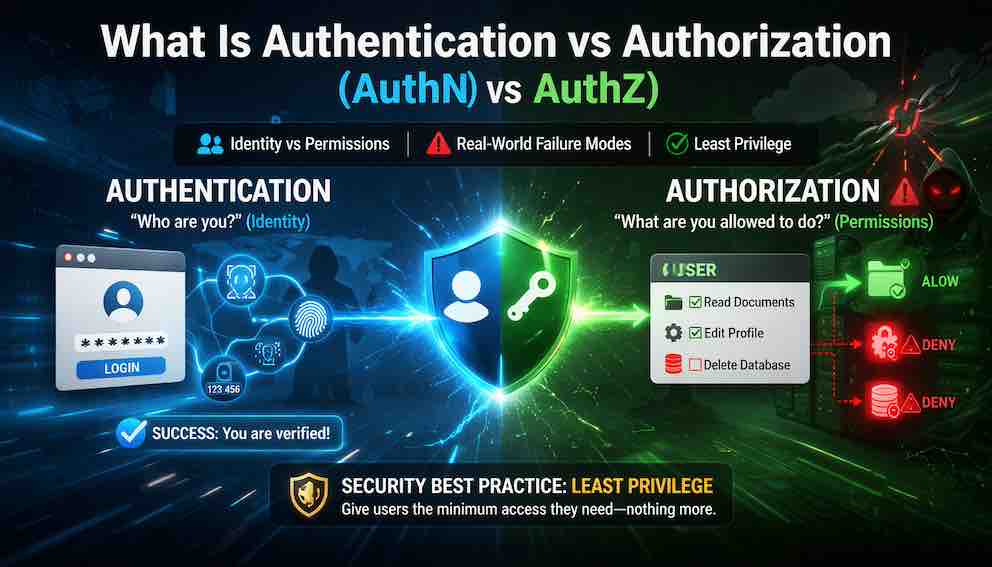
Authentication proves who you are. Authorization determines what you can do.
Two sentences. Yet we have seen billion-dollar companies get this wrong. We have seen security audits fail because of this confusion. We have seen breach after breach trace back to a developer who thought authentication was enough.
Let us look at an analogy that will make this stick.
The Airport Analogy
You arrive at the airport to catch a flight. You go through two completely different checks.
First, you prove who you are. You show your passport or driver's license. A gate agent compares your face to the photo. They verify that you are, in fact, the person named on the ticket. This is authentication — proving identity.
Then, you board the plane. The gate agent scans your boarding pass. They check whether you are allowed on this specific flight to this specific destination at this specific time. You might be authenticated as a valid passenger, but that doesn't mean you can board Flight 407 to Chicago. Your ticket says you belong on Flight 203 to Denver. This is authorization — determining permissions.
Notice what happens if the airport skips either check. If they authenticate you but never check your boarding pass, you can walk onto any plane — you're you, but you're on the wrong flight. If they check your boarding pass but never verify your identity, anyone with a stolen boarding pass can fly as you.
The airport needs both. Your software needs both. And just like the airport, the checks happen at different times, in different ways, and serve different purposes.
Part Two: Understanding the Difference
The two words sound similar. Both start with "auth." Both are about security. Both involve checking something before allowing access. But they operate in fundamentally different ways.
Many frameworks bundle them together, which can blur the distinction. Django's @login_required decorator checks authentication. Spring Security's @PreAuthorize("hasRole('ADMIN')") checks authorization. Many frameworks use the same session or token for both purposes, but that shared plumbing does not make them the same thing.
The two concepts differ across every dimension that matters. Authentication asks who are you? Authorization asks are you allowed to do this? Authentication happens once per session, usually at login. Authorization happens on every single request that touches a resource. Authentication uses passwords, MFA, biometrics, and certificates to produce an identity claim — a session or token. Authorization takes that identity and checks it against roles, policies, and access control lists to produce a binary decision: allow or deny. When authentication fails, an attacker impersonates someone. When authorization fails, an attacker accesses something they should not — often while being perfectly authenticated as themselves.
The most dangerous mistake is assuming that strong authentication removes the need for explicit authorization. This is like installing a deadbolt on the front door and then leaving every interior door unlocked. The deadbolt is great. But once someone is inside — legitimately or not — they can go anywhere.
Part Three: The Four Real-World Failure Modes
Authentication-authorization confusion causes breaches in four distinct patterns. Learn these patterns and you will spot vulnerabilities that other developers miss.
Failure Mode #1: Missing Authorization Checks Entirely
The system verifies a user's identity and then grants access to anything that user requests — no further questions asked. The authentication check passes, and the application treats that as sufficient clearance for everything that follows.
The gap is straightforward: confirming who someone is does not confirm what they are allowed to see. This class of vulnerability has a name — Insecure Direct Object Reference (IDOR) — and it appears constantly in bug bounty reports and breach post-mortems. The attacker does not need to steal credentials or exploit anything sophisticated. They simply change a number in the URL. Patient 123 becomes patient 124. Order 1042 becomes order 1043. The system obliges every time, because it never stops to ask whether the authenticated user has any right to that specific record.
The 2019 Capital One breach followed this pattern. An attacker exploited a misconfigured firewall to gain a foothold, then accessed data belonging to hundreds of thousands of customers because the application had no fine-grained authorization checks. The attacker's requests were treated as authenticated; the system never asked whether those requests were authorized.
The fix is simple to state and easy to forget: authentication and authorization are two separate gates, and passing through the first does not open the second. Every access to a resource must verify that the authenticated user has permission for that specific resource — not just that they are logged in.
Failure Mode #2: Authorization at Login Only
The system checks authorization once — when the user logs in — and then caches the result for the entire session. If permissions change while the user is logged in, the system does not notice. An admin revokes access. A subscription is cancelled. A role is downgraded. None of it matters until the session ends and a fresh check is made.
A subscription service where a user cancels their premium plan is the classic example. The system should downgrade permissions immediately. Instead, because permissions were snapshot at login, the user continues to access premium features for days or weeks. This is not a hypothetical edge case — it is a billing vulnerability that affects revenue, not just security.
Authorization should be re-checked on every request, or permission caches should carry a short TTL that forces regular revalidation. Permission changes should be reflected within minutes, not sessions.
Failure Mode #3: Coarse-Grained Roles
The system assigns roles, but those roles are too broad. A "Manager" role grants visibility into all customer data when the manager should only see data for their region. An "Admin" role permits deletion of any record when it should be limited to certain object types. The role is not wrong — it is simply imprecise, and that imprecision creates exposure.
A SaaS company where the "Support" role could view any customer ticket illustrates the risk. That access was appropriate for legitimate support work — until a malicious support agent started exfiltrating competitor data. The role was correct for 99% of cases. The 1% caused a breach.
The fix is to move from coarse-grained roles to fine-grained attributes. Rather than asking whether someone is a Manager, the system should ask whether they are a Manager of Region X. Rather than asking whether someone is an Admin, it should ask whether they have permission to delete objects of this specific type. This is the shift from RBAC to ABAC (Attribute-Based Access Control), which we will cover in a later Article.
Failure Mode #4: Client-Side Authorization Checks
The authorization logic lives in the frontend — a JavaScript application, a mobile app — and the backend assumes that logic will hold. It will not. An attacker does not use the frontend. They send HTTP requests directly to the API, bypassing every check the UI was supposed to enforce.
This pattern appears constantly in mobile apps that hide admin features from non-admin users in the interface while leaving the underlying API endpoints completely unprotected. The attacker inspects the network traffic, identifies the admin endpoint, and calls it directly using a regular user token. The button was hidden. The door was open.
Authorization must be enforced on the backend, at the API layer, for every request. The frontend can hide elements for the sake of user experience, but it cannot be trusted as a security boundary. APIs are especially exposed here — unlike a web UI, there is no interface complexity standing between an attacker and the functionality. Every endpoint is callable by anyone who can construct an HTTP request.
Part Four: The Real-World Damage
The OWASP Top 10 — the industry-standard list of the most critical web application security risks — has ranked Broken Access Control as the #1 risk for multiple years running. Not SQL injection. Not XSS. Broken access control. That means the most common, most dangerous vulnerability in web applications is users accessing data or performing actions they shouldn't be permitted to.
The breaches are not obscure. In 2023, a Twitter authorization bug allowed tweets intended for a small, private Circle to be visible to anyone — a privacy violation affecting millions of users. That same year, a Microsoft authentication token misconfiguration allowed access to government customer emails, compromising US government agencies. In 2021, Peloton's API had no authorization checks at all, allowing any authenticated user to read any other user's private account data. In 2018, Facebook's "View As" feature contained an authorization flaw in token generation that compromised 50 million accounts. In 2016, Uber's AWS credentials were found in a public GitHub repository — an authentication failure — and because those credentials carried excessive permissions, the attacker could access any Uber data they wanted, which is an authorization failure layered on top.
The pattern across all of them is the same: either authentication fails and an attacker impersonates someone, or authorization fails and an authenticated user accesses something they shouldn't. Often both failures are present, and they compound each other.
Part Five: A Word on OIDC and OAuth
Any practical discussion of AuthN and AuthZ has to mention the two protocols you will encounter in almost every modern system.
OpenID Connect (OIDC) handles authentication. It is a layer built on top of OAuth 2.0 that lets an identity provider — Google, Microsoft, your company's SSO system — confirm a user's identity and return a standard token called an ID token, which contains claims about who the user is.
OAuth 2.0 handles authorization. It defines how a system can grant limited access to resources on behalf of a user, expressed through scopes that describe specific permissions: read:emails, write:calendar, and so on.
The reason both matter here is that they're frequently conflated. OAuth was designed for authorization — granting access — but it's routinely misused as an authentication mechanism. "Log in with Google" works because OIDC is layered on top of OAuth specifically to add identity verification. Using an OAuth 2.0 access token issued by a third party as proof of a user's identity — without verifying who the token was issued for and by whom — is a well-documented mistake.
The short version: OIDC answers who is this user? OAuth answers what is this user or service allowed to do? The distinction maps directly onto AuthN and AuthZ.
Part Six: Least Privilege — The Guiding Principle
If authentication vs authorization is the what, least privilege is the how. It is the principle that should guide every authorization decision you make.
Least privilege means giving every user, service, and process the minimum permissions necessary to perform its function — and nothing more.
Least Privilege for Users
A customer service agent needs to view orders, update shipping addresses, and process refunds. They do not need to view full credit card numbers, delete orders, access internal analytics dashboards, or see other agents' performance metrics. Each unnecessary permission is a potential breach surface. If the agent's account is compromised, every extra permission becomes an attacker's tool.
Least Privilege for Services
A report-generation service needs to read from the orders database. It does not need to write to it, read from the customer payment table, access the authentication service, or connect to the internet directly. In practice this means using separate database users with SELECT only — not INSERT, UPDATE, or DELETE — network policies that allow only necessary connections, and service accounts with scoped permissions rather than admin access.
The Tension: Least Privilege vs. Practicality
Least privilege sounds obvious. In practice, it creates tension. Perfect least privilege means hundreds of fine-grained permissions, dozens of service accounts, and a complex policy engine — secure but operationally painful. Three roles (Admin, User, Guest) is easy to manage but leaves too much exposure.
The answer is to start coarse and refine deliberately: begin with basic roles, monitor what users and services actually do, add finer-grained controls where you see risk, and regularly audit and remove unused permissions. You don't need perfect least privilege on day one. You need to move toward it continuously.
Part Seven: How to Think About AuthN vs AuthZ in Your Code
A practical mental checklist for reviewing any system. Apply these questions to every endpoint, every API, every data access.
Authentication Questions
Does this endpoint require authentication at all — or is it intentionally public? How is the authentication credential transmitted — is it safe from appearing in URLs or logs? What happens if the credential is missing — does the system reject the request, or silently treat the caller as anonymous? What happens if the credential is expired? Is MFA required for sensitive operations?
Authorization Questions
After authentication, does the system check specific permissions for this specific resource — not just whether the user is logged in? Is the authorization check enforced on the backend, not just hidden behind a UI element? Are permissions checked on every request, not loaded once at login and cached indefinitely? Does the system use fine-grained attributes like resource ownership, region, or account status — or only coarse roles that group too much together? Is there a default-deny policy, where access is denied unless a rule explicitly permits it?
If you can answer yes to all of these, you are ahead of the majority of production systems.
Part Eight: Testing for Authorization Failures
Two tests surface most broken access control vulnerabilities, and neither requires special tools.
Horizontal privilege escalation tests whether a user can access another user's resources at the same permission level. Log in as User A, then try to access User B's resources by changing IDs in URLs, API parameters, or request bodies. If /api/orders/1042 returns User A's order, try /api/orders/1043. If you can see it, the system has a broken authorization check — a classic IDOR vulnerability.
Vertical privilege escalation tests whether a lower-privileged user can reach higher-privileged functionality. Log in as a regular user, then try to call admin endpoints directly via HTTP, whether or not they're visible in the UI. If the request succeeds, authorization is missing at the API layer.
The fact that these simple, unsophisticated tests still find vulnerabilities in production systems every day is a measure of how often authorization is treated as an afterthought.
Part Nine: Where This Fits in the Unbroken Chain
From Article 1: authentication and authorization live at Layer 3 (The Backend) and Layer 4 (The Authorization Layer). Here is where each happens in the request flow:
Authentication must happen before authorization — you cannot decide what someone can do until you know who they are. But authorization is the final gate before data access. Skip either, and the chain breaks.
Closing: The Front Door and the Interior Doors
Let us return to the healthcare application we opened with.
After we found the vulnerability — User A could see any patient record by changing a number in the URL — the engineering team fixed it. They added a single check: the authenticated user must have an explicit relationship with the requested patient record. A doctor could see their patients. A nurse could see patients on their floor. A patient could see their own records.
No one could see records they shouldn't.
The authentication system stayed exactly the same. It was never broken. The fix was purely authorization.
That's the lesson. Authentication is the front door. It keeps out people who shouldn't be in the building at all. But once someone is inside — legitimately or not — you need interior doors. You need locks on every room. You need to check every access.
Build the front door. Then build the interior doors. And never confuse the two.
About N Sharma
Lead Architect at StackAndSystemN Sharma is a technologist with over 28 years of experience in software engineering, system architecture, and technology consulting. He holds a Bachelor’s degree in Engineering, a DBF, and an MBA. His work focuses on research-driven technology education—explaining software architecture, system design, and development practices through structured tutorials designed to help engineers build reliable, scalable systems.
Disclaimer
This article is for educational purposes only. Assistance from AI-powered generative tools was taken to format and improve language flow. While we strive for accuracy, this content may contain errors or omissions and should be independently verified.