Learning Paths
Last Updated: April 8, 2026 at 19:30
Public Key vs Private Key Explained: Encryption, Signing, and the Real Difference That Matters
A practical guide to asymmetric cryptography, showing how public and private keys work together to secure communication, verify identity, and power modern systems like TLS, SSH, and JWTs
Public and private keys form the foundation of asymmetric cryptography, but they serve two very different purposes. One key is used to encrypt data for secrecy, while the other is used to sign data for identity and integrity. Confusing these roles leads to common security mistakes that can weaken systems or expose sensitive data. This article breaks down the difference through simple analogies and real-world examples so you can clearly understand when and how each key is used
A Story: The Two Locks
Imagine you have a box with two different locks.
The first is a padlock. You have the key. Anyone can buy the same padlock at the store, but only you hold the key that opens yours. If you lock a box with your padlock and send it to someone, they cannot open it — they do not have your key. This is not useful for sending secrets to others.
The second is a mailbox lock. The mailbox has a slot that anyone can drop letters into. No key is needed to deposit something. But to retrieve letters, you need the key — and only the owner has it. Anyone can send a secret to the owner. This is useful, but it only works one way.
Now imagine a different problem. You receive a message that claims to be from your friend. How do you know it really came from them? Anyone could write a letter and sign your friend's name.
Your friend solves this with a signature stamp — a special stamp that creates a unique, unforgeable mark. Only they possess the stamp. But anyone who knows them can verify it. When you see the stamp on a letter, you know the message came from them.
The padlock, the mailbox lock, and the signature stamp represent different uses of keys.
In the world of asymmetric cryptography, you get two mathematically linked keys: a public key and a private key. They are used differently depending on the goal.
The private key must be kept secret. Only you have it. It is like the key to your mailbox or your personal signature stamp. The public key can be shared with anyone. It is like the slot on your mailbox or a verification guide that anyone can use to check your signature.
What makes asymmetric cryptography powerful is that these two keys serve two very different purposes.
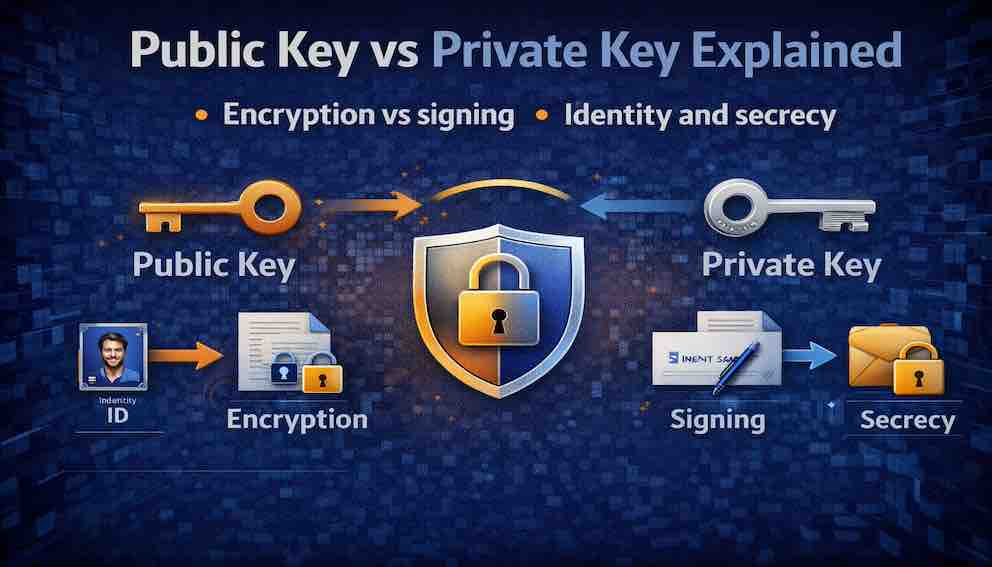
For secrecy, you encrypt with the public key. Only the private key can decrypt. This ensures that only the intended recipient can read the message.
For identity, you sign with the private key. Anyone with the public key can verify the signature. This proves the message came from you and was not tampered with.
One key pair. Two distinct operations. Two different security properties. Understanding the difference between them is essential to understanding how trust, identity, and secrecy work in modern systems.
What Are Public and Private Keys?
A private key is a secret cryptographic value known only to its owner. It must never be shared. It is used to decrypt messages that were encrypted with the corresponding public key, and to create digital signatures.
A public key is a cryptographic value that can be freely distributed. It is mathematically linked to the private key. It is used to encrypt messages that only the private key can decrypt, and to verify digital signatures created with the private key.
The two keys are mathematically related: what one key does, the other can undo. But crucially, it is computationally infeasible to derive the private key from the public key. This is what makes the system secure.
Think of the relationship as a one-way street. The public key is the entrance; the private key is the exit. You can travel from public to private in a specific mathematical sense — encrypting a message that only the private key can read — but you cannot go backward. You cannot derive the private key from the public key alone.
A note on terminology: asymmetric cryptography is often contrasted with symmetric cryptography, where the same key both encrypts and decrypts. Symmetric keys are faster and simpler, but they require both parties to already share a secret. Asymmetric key pairs solve this problem: you can establish a secure channel with someone you have never spoken to before, using only their public key. In practice, most real-world systems use both — asymmetric cryptography to establish the initial secure channel, and symmetric cryptography to handle the bulk of data transfer efficiently. TLS, the protocol behind HTTPS, is the clearest example of this hybrid approach.
Encryption: Achieving Secrecy
When you want to send a secret message to someone, you encrypt it using their public key. Only their private key can decrypt it.
Here is how it works in practice. You obtain the recipient's public key — from their website, a key server, or a certificate. You encrypt the message using that public key and send it over any channel, even a public or insecure one. The recipient uses their private key to decrypt the message. No one else can read it, even if they intercept it in transit.
What encryption provides: confidentiality. Only the intended recipient can read the message. There is no need for a pre-shared password or secret.
What encryption does not provide: authentication of the sender. Encrypting with the recipient's public key does not prove who sent the message. Anyone could have encrypted it. Nor does encryption alone guarantee integrity — that the message has not been tampered with — though modern protocols combine encryption with authentication to address this.
One important note on forward secrecy: static public-key encryption, where the same long-lived private key is used repeatedly, does not provide forward secrecy. If the private key is later compromised, all past messages encrypted to that key can be decrypted. Forward secrecy is a property of key exchange protocols like ECDHE (Elliptic Curve Diffie-Hellman Ephemeral), which generate a fresh key pair for each session and discard it afterward. TLS uses this approach; static RSA encryption does not.
One more critical detail about real-world encryption: asymmetric algorithms like RSA and ECC are not used to encrypt message content directly. They are slow and have size limits. In practice, your software generates a random symmetric key, encrypts the actual message content with that symmetric key (using a fast algorithm like AES), and then uses the recipient's public key to encrypt only the symmetric key. The recipient decrypts the symmetric key with their private key, then uses it to decrypt the message. This is called hybrid encryption, and it is how PGP, TLS, and virtually every practical encryption system works.
Real-world examples:
- Email encryption (PGP/GPG). The message is encrypted with a random session key, which is itself encrypted with the recipient's public key. Only they can recover the session key and read the message.
- TLS/HTTPS. Your browser uses the server's public key (from its TLS certificate) to help establish a shared symmetric session key. All subsequent communication uses that symmetric key.
Signing: Achieving Identity and Integrity
When you want to prove that a message came from you and that it has not been tampered with, you sign it with your private key. Anyone with your public key can verify the signature.
Here is how it works. You create your message and compute a cryptographic hash of it — a short, fixed-length fingerprint of the content. You then apply a mathematical signing operation using your private key to produce a signature from that hash. You send the message and the signature together.
When a recipient wants to verify the signature, they compute their own hash of the message and use your public key to verify that the signature corresponds to that hash. If the check passes, two things are confirmed: the message came from whoever holds the private key, and the message has not been altered since it was signed.
A note on precision: the phrase "encrypt the hash with your private key" is sometimes used as a simplified explanation of signing, and it holds for RSA. But in elliptic curve schemes like ECDSA and EdDSA, signing is a distinct mathematical operation, not encryption in reverse. The intuition — that only the private key can produce a signature that the public key can verify — is correct. The mechanism differs by algorithm.
What signing provides:
Authentication. The signature proves the message came from the holder of the private key. If you trust that the public key belongs to a specific person or system, you know they signed it.
Integrity. If the message is altered even slightly after signing, the hash will not match, and the signature will fail verification.
Non-repudiation. The signer cannot later credibly deny having signed the message, assuming the private key has not been compromised.
What signing does not provide: confidentiality. A signed message is not encrypted. Anyone can read it. Signing proves who sent something and that it arrived intact. It does not hide the content.
Real-world examples:
- JWT (JSON Web Tokens). The authorization server signs the token with its private key. Your application verifies the signature with the server's public key. This proves the token was issued by the real authorization server and has not been tampered with.
- TLS certificates. A Certificate Authority signs a website's certificate with the CA's private key. Your browser verifies the signature using the CA's public key. This proves the certificate was issued by a trusted authority.
- Software code signing. A developer signs their application with their private key. Your operating system verifies the signature with the developer's public key, confirming the software came from that developer and has not been modified.
- SSH authentication. The server challenges your client to prove it holds the private key. Your client produces a signature; the server verifies it with the stored public key. This proves your identity without transmitting the private key.
- Git commit signing. Developers sign commits with their private key. Team members verify signatures with the developer's public key, confirming authorship.
Encryption vs Signing: The Critical Distinction
This is the most common point of confusion. Many developers assume that because the same key pair is involved, encryption and signing are interchangeable. They are not.
The simple rule is this: you encrypt with the public key to keep secrets — only the private key holder can read it. You sign with the private key to prove identity — anyone with the public key can verify it came from you.
Comparing the two side by side in plain terms:
For encryption, the operation is performed by anyone with the public key; the result can be undone only by the private key holder; the goal is confidentiality; the message content is hidden.
For signing, the operation is performed only by the private key holder; the result can be verified by anyone with the public key; the goal is authentication and integrity; the message content is visible.
Encrypting with a private key provides no secrecy — anyone with the public key can decrypt it. Signing is not encryption. They serve different purposes and must not be substituted for each other.
A common mistake is to say 'encrypt with the private key.'. For RSA, this operation is mathematically possible but it is actually for signing, not encryption. For ECC, the operation does not exist at all. Always use the correct terminology: sign with the private key, encrypt with the public key.
How Public Keys Are Distributed: The Trust Problem
Public keys are meant to be shared. But how do you know that a public key actually belongs to the person it claims to belong to? This is the public key distribution problem, and it is one of the hardest problems in applied cryptography.
Consider the risk: Alice wants to send an encrypted message to Bob. She downloads a key from a website claiming to be Bob's. But if an attacker has replaced that key with their own, the attacker can decrypt every message Alice sends — and Alice would never know. This is a man-in-the-middle attack.
Several solutions exist, each with different trade-offs.
Public Key Infrastructure (PKI) with Certificate Authorities. This is the system behind TLS/HTTPS. Certificate Authorities are trusted third parties that verify the identity of key holders and issue signed certificates. Your browser trusts a set of root CAs. When a website presents a certificate, your browser verifies the CA's signature on that certificate, chaining back to a trusted root. This system scales to the entire internet, but it introduces a centralized trust hierarchy with its own risks — a compromised CA can issue fraudulent certificates for any domain.
Web of Trust (PGP/GPG). In PGP, users sign each other's public keys. If Alice trusts Carol, and Carol has signed Bob's key, Alice can decide to trust Bob's key through Carol. There is no central authority; trust is distributed and personal. This model works well within communities but is difficult to scale and requires users to actively manage their trust relationships.
Trust on First Use (TOFU). SSH uses this model. The first time you connect to a server, you see its public key fingerprint and accept it. SSH remembers it. If the key changes in the future, SSH warns you. This is convenient but vulnerable to interception on the very first connection.
Out-of-band verification. For high-security situations, you verify a public key through a separate channel entirely — a phone call, an in-person meeting, or a manual comparison of fingerprints. Signal's safety numbers feature is a consumer-friendly version of this.
Key Algorithms
Not all key pairs are created equal. Different algorithms use different mathematical foundations, which affect key size, performance, and security levels. The algorithm defines how the key pair is generated and how operations (encryption, signing) are performed. The key itself is the actual cryptographic value produced by that algorithm.
RSA – The oldest and most widely supported asymmetric algorithm, based on the difficulty of factoring large prime numbers. RSA requires large key sizes: 2048 bits at minimum, with 3072 or 4096 preferred. It is well-understood and universally supported but slower than modern alternatives, with larger keys and signatures. Used in TLS certificates, SSH, PGP, and JWT signing (RS256).
ECC (Elliptic Curve Cryptography) – Based on elliptic curve mathematics. A 256-bit ECC key provides roughly equivalent security to a 3072-bit RSA key. ECC is faster, produces smaller keys and signatures, and consumes less power, making it ideal for mobile and embedded systems. Used in modern TLS configurations, SSH, and JWT signing (ES256).
EdDSA (Ed25519) – A modern elliptic curve algorithm designed specifically for digital signatures. It is fast, resistant to common implementation pitfalls, and the preferred choice for new SSH keys and many modern protocols.
Private Key Protection: The Most Critical Responsibility
The security of any asymmetric cryptosystem rests entirely on the protection of the private key. If the private key is compromised, all security guarantees collapse. Every signature ever made with that key becomes suspect. Every message ever encrypted to that key may be exposed.
Private keys are compromised in predictable ways: stolen from disk by an attacker who gains access to a server or workstation; extracted from memory; found in backups that were not properly secured; accidentally committed to version control; or obtained through phishing of an administrator. Accidental GitHub commits are among the most common real-world causes of private key exposure — automated scanners watch public repositories specifically for this.
The best protection is to keep the private key out of software entirely.
Hardware Security Modules (HSMs) are dedicated hardware devices that generate, store, and use private keys without ever exposing the raw key material to the host system. Cryptographic operations happen inside the HSM. The key never leaves. This is the gold standard for high-security environments.
Cloud Key Management Services (AWS KMS, Azure Key Vault, Google Cloud KMS) provide HSM-grade protection without requiring you to manage hardware. You never see the raw key material; you request that the service perform operations on your behalf.
Secure Enclaves (TPM chips, Apple Secure Enclave, Android StrongBox) provide similar isolation on consumer devices. Your device's biometric data and stored credentials never leave the secure enclave; cryptographic operations happen there.
Encrypted key files are the minimum acceptable practice for keys stored on disk. An SSH private key encrypted with a strong passphrase is useless to an attacker without the passphrase. This is not as strong as hardware protection, but it is far better than an unprotected file.
Where Public and Private Keys Appear in Practice
TLS/HTTPS: The web server holds a private key. The corresponding public key is embedded in the server's TLS certificate, which is signed by a Certificate Authority. Your browser verifies the CA's signature on the certificate, confirms the server's identity, and uses the public key to help establish a symmetric session key. All subsequent communication uses that symmetric key.
SSH: Your client holds a private key, usually stored in ~/.ssh/id_ed25519 or ~/.ssh/id_rsa. The server stores your public key in ~/.ssh/authorized_keys. When you connect, the server challenges your client to prove possession of the private key by producing a valid signature. The server verifies the signature and grants access.
JWT (JSON Web Tokens): The authorization server holds a private key and uses it to sign every JWT it issues. Your application holds the corresponding public key and uses it to verify incoming tokens. A valid signature proves the token was issued by the legitimate authorization server and has not been altered.
Code Signing: The software developer signs their executable or installer with their private key. Your operating system verifies the signature against the developer's certificate (issued by a CA) before allowing the software to run.
Blockchain and Cryptocurrency: Your wallet's private key controls access to your funds. The corresponding public key is used to derive your wallet address. Sending a transaction requires signing it with your private key; the network verifies the signature with your public key. Losing the private key means losing access to the funds permanently.
Email Encryption (PGP/GPG): You publish your public key to a key server. Others use it to encrypt email to you. You sign outgoing email with your private key; others use your public key to verify that the message is genuinely yours and has not been modified in transit.
Common Mistakes
Confusing encryption with signing. Using a private key to "encrypt" a message does not provide secrecy — anyone with the public key can decrypt it. This is actually a signature operation. Use the correct operation for the correct purpose: public key for encryption, private key for signing.
Exposing private keys. Committing a private key to a Git repository — even briefly, even in a private repository — should be treated as a full key compromise. Rotate immediately. Secrets scanners that monitor public repositories find these within minutes of a push.
Using weak key sizes. RSA-1024 is broken and must not be used. RSA-2048 is the absolute minimum. For ECC, use at least 256 bits. For new SSH keys, use Ed25519.
Not verifying public keys. Accepting a public key without verifying it actually belongs to the intended party enables man-in-the-middle attacks. Always verify through trusted channels — PKI, web of trust, or out-of-band confirmation.
No key rotation plan. Using the same key pair indefinitely increases the risk of undetected compromise. Rotate keys on a regular schedule. Have a documented revocation procedure ready to execute before you need it.
Using the same key pair for encryption and signing. A compromise of one operation then affects the other. Use separate key pairs for different purposes where your system allows it.
Ignoring side-channel attacks. Cryptographic implementations can leak information through timing differences, power consumption, or electromagnetic emissions. Use constant-time implementations and hardware protection for high-security keys.
What You Should Take Away
A public and private key pair serves two distinct purposes: encryption for secrecy, and signing for identity and integrity. The operations are different, the keys involved are different, and the security properties they provide are different.
The private key is your digital identity. It is the only proof that you are you. It must be protected accordingly — with hardware where possible, with strong encryption at minimum, and with a rotation and revocation plan always ready.
The public key is your address. Share it freely. Publish it anywhere. Let anyone use it to send you secrets or to verify your signature.
About N Sharma
Lead Architect at StackAndSystemN Sharma is a technologist with over 28 years of experience in software engineering, system architecture, and technology consulting. He holds a Bachelor’s degree in Engineering, a DBF, and an MBA. His work focuses on research-driven technology education—explaining software architecture, system design, and development practices through structured tutorials designed to help engineers build reliable, scalable systems.
Disclaimer
This article is for educational purposes only. Assistance from AI-powered generative tools was taken to format and improve language flow. While we strive for accuracy, this content may contain errors or omissions and should be independently verified.