
Learning Paths
Last Updated: May 9, 2026 at 17:30
Microfrontends Explained: Architecture, Tradeoffs, and When to Actually Use Them
A practical guide to scaling frontend teams with independent, domain-owned UI fragments — without drowning in complexity
Microfrontends are a way for large engineering organisations to scale frontend development by splitting a single UI into independently owned and independently deployed pieces aligned to business domains. This guide explains how microfrontend architectures work, how teams integrate their applications using techniques like Module Federation and server-side composition, and why vertical ownership matters more than frontend tooling. It explores the real tradeoffs involved, including performance overhead, dependency management, state coordination, testing complexity, CI/CD challenges, and platform engineering requirements. Most importantly, it explains when microfrontends genuinely make sense, when they do not, and why organisational structure ultimately determines whether the architecture succeeds or fails.
What Are Microfrontends?
If you have read about microservices, the idea will feel familiar. Microservices split a backend application into small, independently deployable services, each may be owned by a different team. Microfrontends apply exactly the same thinking to the frontend.
Instead of one large JavaScript application that all your teams work on together, you have multiple smaller frontend applications — each may be owned by a separate team, each built and deployed independently — that are stitched together into a single experience for the user. From the user's perspective, they are visiting one website. Under the hood, the page they are looking at might be assembled from three or four separately deployed pieces, each maintained by a different team.
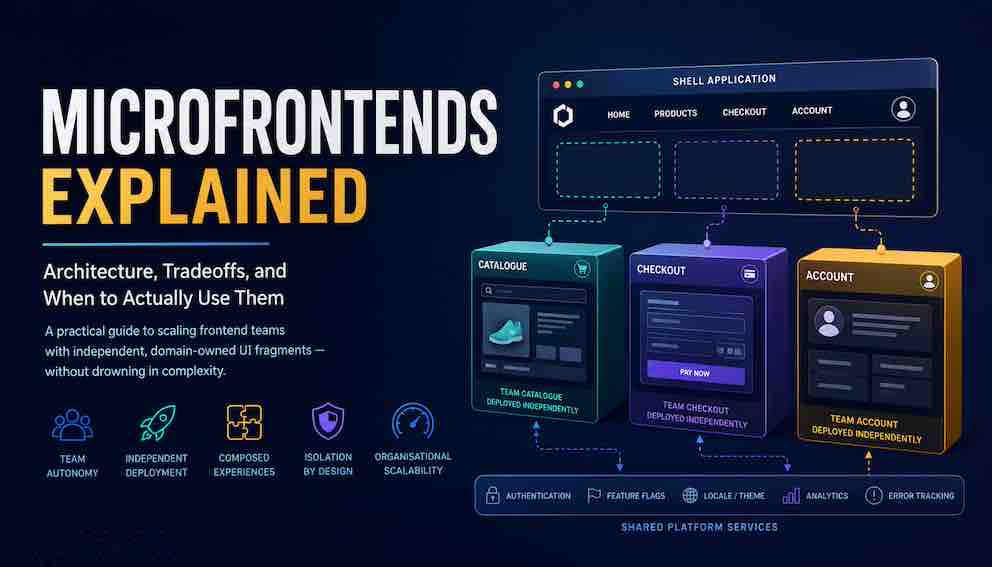
To make this concrete, imagine an e-commerce site. The search bar and results page is one microfrontend, owned by the search team. The product detail page is another, owned by the catalogue team. The cart and checkout flow is another, owned by the payments team. The account settings page is another, owned by the identity team. Each of these runs as its own application. Each team deploys their piece on their own schedule. A bug fix in checkout ships without the search team even knowing about it.
The thing that ties them together is called the shell application. The shell is a thin wrapper that boots first when a user arrives. It handles global concerns — logging the user in, managing top-level navigation, and deciding which microfrontend to load based on the current URL. When a user navigates to /checkout, the shell fetches the checkout microfrontend and mounts it into the page. When they navigate to /account, it swaps it out for the account microfrontend. The user experiences a seamless application. The teams experience genuine independence.
This is fundamentally different from breaking your UI into reusable React(or angular or vuejs) components or shared npm packages. Those are code organisation strategies. Microfrontends are a deployment and ownership strategy. The defining characteristic is not how the code is structured — it is that each piece is independently deployable by an independent team.
The Problem Microfrontends Are Solving
Before we look at any technology, it is worth being honest about why microfrontends exist. They do not exist because someone figured out a smarter way to bundle JavaScript. They exist because large frontend teams hit a specific and painful wall.
Imagine ten teams all working on the same single-page application. Every team pushes changes to the same codebase. Merge conflicts happen daily. A change to the payment form accidentally breaks the product search page because both touched a shared utility. Deployments become a ceremony — teams must coordinate, test together, and release together. If one team is not ready, no one ships. CI pipelines slow down as the codebase grows. Meetings multiply to compensate for the lack of clear ownership.
These are not JavaScript problems. They are organisational scaling problems. The monolithic frontend is not technically broken — it is just a poor fit for a distributed team structure.
Microfrontends are the frontend world's answer to the same question that microservices answered on the backend: how do you let independent teams own and ship their piece of the product without stepping on each other?
The answer is to split the frontend into independently owned, independently deployed pieces, each aligned to a business domain. Just like a microservices architecture lets a payments team deploy their service without asking the inventory team for permission, a microfrontend architecture lets a checkout team deploy their UI without waiting for the search team.
A Mental Model Before the Details
Before the contrast makes sense, it helps to be precise about what a monolithic frontend actually is, because the term gets thrown around loosely.
A monolithic frontend is a single application that contains all of your UI code. Every page, every component, every feature lives in one codebase. There is one build process that compiles it all together, and one deployment that ships it all at once. When you visit a typical React or Vue application, you are almost certainly looking at a monolithic frontend. The entire application — home page, search, product listings, cart, checkout, account — is bundled into one JavaScript artifact that the browser downloads and runs.
This is not inherently bad. For most teams, it is the right choice. The code is in one place, so finding things is straightforward. The build is a single process, so there is no orchestration to manage. Debugging is contained — when something breaks, the error and the code that caused it live in the same repository. For a team of five or ten engineers all working closely together, a monolithic frontend is genuinely the simplest and most productive option.
The problem emerges at scale. When twenty or thirty engineers across five different teams all push changes to the same codebase, the simplicity that made the monolith pleasant becomes a bottleneck. Now hold the contrast:
A monolithic frontend offers simple technology with high coordination overhead. One codebase, one build, one deployment. But as teams grow, everyone waits on everyone else. A broken test in one team's code blocks the whole release. Merge conflicts are daily friction. Adding more engineers makes the coordination problem worse, not better.
A microfrontend architecture offers complex technology with low coordination overhead. Many codebases, many builds, many deployments. Teams genuinely move independently — the checkout team ships when they are ready without waiting for the search team. But the complexity is real: there is orchestration to manage, distributed debugging to contend with, and cross-team contracts to maintain.
Microfrontends help your organisation scale. Rolling out new pages and features becomes easier when teams move independently. But you pay for that scalability with increased technical complexity. A monolithic UI keeps everything colocated and technically simple. Changes require more coordination, but debugging, dependency management, and deployment remain straightforward. Neither tradeoff is wrong. The right choice depends on whether the coordination cost of the monolith hurts more than the complexity cost of microfrontends.
The Frontend Architecture Spectrum: From Monoliths to Microfrontends
Microfrontends are one option among several, and knowing the full spectrum helps you pick the right tool.
Server-rendered MVC is the oldest model. The server builds a complete HTML page and sends it to the browser. There is very little JavaScript involved. This works excellently for content-heavy sites where pages do not need much interactivity, and it is making a comeback through frontend-native tools like Next.js, Remix, Astro, and the resurgent interest in htmx. It handles teams reasonably well because page boundaries are natural ownership boundaries — each team can own entire pages without stepping on each other's work.
The monolithic SPA solved the interactivity problem. React, Vue, and Angular let you build rich, app-like experiences entirely in the browser. One codebase, one build. For a single frontend team or two, this is genuinely the best choice. Developer experience is smooth, debugging is contained, and the cognitive overhead is manageable.
The modular monolith is an underrated middle ground that many teams skip past too quickly. You organise a single codebase into clearly bounded modules — each with explicit public interfaces and private internals — but you still build and deploy the whole thing together. This gives teams cleaner ownership without the operational complexity of independent deployments. If your actual pain is messy code organisation rather than blocked deployments, this solves your problem at a fraction of the cost of microfrontends.
Islands architecture sits on a different axis to the others and is worth placing carefully. Like server-rendered MVC, the server sends complete HTML first, so the page loads fast. Like microfrontends, individual interactive pieces can be developed and reasoned about independently. But unlike microfrontends, the primary goal is performance, not team scaling. The server renders a full page of static HTML and only specific interactive components — the islands — are hydrated with JavaScript. A news site is the canonical example: the article text arrives instantly from the server, and only the live comments widget receives JavaScript. The whole page can still belong to one team. Tools like Astro are built around this model. Islands architecture suits content-heavy sites with pockets of interactivity, not large engineering organisations with deployment bottlenecks.
Build-time microfrontends are where many teams land first when they outgrow the modular monolith. Each team publishes their UI as a versioned npm package. A host application installs those packages and compiles them together at build time. This is a genuine step toward separation — teams work in different repositories and have cleaner boundaries — but it is not true deployment independence. Shipping a change still means bumping a version number in the host app and triggering a full rebuild. Think of it as a useful stepping stone rather than the destination.
Runtime microfrontends are what most people mean when they say microfrontends. Independent teams own independent UI fragments that are loaded and composed at runtime — either in the browser or on the server — without a shared build step. Full deployment independence comes at the cost of significant orchestration complexity. This makes sense when you have three or more frontend teams of several engineers, who are genuinely blocked by sharing a single deployment pipeline.
Different products and different team structures have different needs. A startup should not use microfrontends. A large enterprise with twelve product teams probably should. Most teams sit somewhere in the middle, and the modular monolith or build-time integration will serve them better than they expect.
The Core Idea: Vertical Ownership
The most important concept in microfrontend architecture is vertical ownership, and it is easy to misunderstand.
A common mistake is to think microfrontends means splitting the UI into reusable fragments — a header component team, a footer component team, a product card team. This sounds sensible but is actually a distributed monolith. You have all the operational complexity of distributed systems and none of the team autonomy benefits, because each of these teams depends on all the others to deliver a user-facing feature.
Vertical ownership means a team owns a complete business capability from the database to the button. The checkout team owns checkout backend services, checkout APIs, and the checkout user interface. The account team owns account databases, account services, and account settings pages. Each team can change their button colour, refactor their API, and deploy to production without talking to another team.
A simple test for whether you have achieved vertical ownership: can your team make a change from the data layer all the way to the user interface without coordinating with another team? If not, you have not yet achieved vertical ownership, and the microfrontend architecture will not deliver the autonomy it promises.
The contrast that makes this concrete: a checkout team owns the cart page, the payment page, and the confirmation page end to end. A horizontally-split team owns "all UI Dialogs across the product." The first team can ship. The second team is always waiting for someone else.
How Microfrontends Are Integrated Into a Single Application
Once you have settled on vertical ownership and team boundaries, you need to decide how the separate fragments come together into a single application that users experience. There are several fundamentally different approaches, and choosing between them involves real tradeoffs.
Build-Time Integration
The simplest approach is to publish each microfrontend as an npm package and have the main application install and compile all of them together at build time.
This feels familiar. Everything is just JavaScript imports. Type safety works as expected. Hot reloading works normally. But this is not true deployment independence. If the checkout team publishes a new version of their package, nothing updates until someone bumps the version in the main app and triggers a full rebuild. You have improved code organisation but not delivery independence. This approach suits teams that want better boundaries without the full operational complexity.
Runtime Integration on the Client Side
This is where most serious microfrontend implementations live. Instead of combining everything at build time, a shell application loads each microfrontend dynamically at runtime, in the browser, on demand.
The shell is a thin application whose job is to handle global concerns — authentication, routing, navigation, and loading microfrontends into the right part of the page. When a user navigates to /checkout, the shell fetches and mounts the checkout microfrontend. When they navigate to /account, it fetches and mounts the account microfrontend.
Module Federation is the Webpack feature that makes this practical. It allows one JavaScript bundle to expose modules that other bundles can import at runtime, across completely separate build processes. The checkout team builds and deploys their bundle independently. When a user lands on the checkout page, Module Federation loads that bundle remotely and connects it into the running shell application. Think of it like a plugin system — the shell does not need to know about all plugins at build time. They are discovered and loaded at runtime.
Single-SPA is a framework-agnostic library that handles the lifecycle of microfrontends — mounting them when a route activates and unmounting them when a route changes. It does not care whether a microfrontend is built with React, Vue, or vanilla JavaScript.
The tradeoff here is real. True deployment independence comes at the cost of runtime orchestration. Multiple JavaScript applications must coexist in the same browser tab. If two microfrontends load different versions of React, you need explicit configuration to share the runtime or you will load React twice. Debugging failures requires understanding the orchestration layer, not just the individual microfrontend.
Server-Side Composition
Instead of assembling the page in the browser, the server assembles it before sending HTML to the user.
When a user requests the homepage, a composition server makes requests to each microfrontend service — header, product listings, recommendations — and stitches their HTML outputs together into a single complete HTML document. The browser receives one page and renders it.
This approach has meaningful advantages. First page load is faster because the browser does not need to download and execute JavaScript before rendering content. Search engine indexing works correctly because spiders see complete HTML. The orchestration complexity moves off the user's device and onto infrastructure you control.
The tradeoffs are different but equally real. The composition server must handle the failure of any individual microfrontend gracefully. If the recommendations service is slow, it must time out rather than delay the whole page. Operational complexity moves to the server layer.
IFrame-Based Isolation
IFrames provide absolute isolation. Each microfrontend runs in a completely separate browsing context. CSS cannot leak across frames. JavaScript cannot accidentally interfere. For regulated environments like banking or healthcare, where hard security boundaries are legally required, iFrames may be the only acceptable approach.
The cost is significant. Each iFrame loads a complete, independent UI application. That means every microfrontend inside an iFrame brings its own framework, its own dependencies, and its own copy of everything. A page with three iFrames might load React three separate times, along with three copies of every shared library. Memory usage explodes. Performance degrades noticeably.
Beyond the weight, the user experience suffers. Communication between frames requires postMessage, which is awkward to debug. Sizing iFrames to fit their content requires JavaScript coordination that often feels janky. Modals and popups get trapped inside the iFrame boundary. Keyboard navigation breaks. Screen readers struggle.
The decision is simple. Use iFrames only when a regulator or a legal compliance team forces you. For everyone else, the weight, complexity, and degraded user experience are not worth the isolation benefits.
The Shell Application: What It Actually Does
It is worth being concrete about what the shell application is, because it is central to most runtime implementations of microfrontend architecture.
The shell is a thin application that boots first and stays running for the user's entire session. It is responsible for:
Global authentication. The shell manages the user's session token. When a microfrontend needs to make an authenticated API call, it reads the token from a shared context that the shell provides. Microfrontends do not each handle login — the shell does it once.
Routing. The shell intercepts URL changes and decides which microfrontend to load. When the URL changes to /checkout, the shell is responsible for fetching the checkout microfrontend bundle and mounting it in the correct DOM location.
Global navigation. The top navigation bar, breadcrumbs, and any chrome that persists across pages typically lives in the shell rather than in any individual microfrontend.
Error boundaries. If a microfrontend crashes, the shell must catch that failure and show a fallback UI rather than letting the entire application blank out.
Shared context. The shell passes cross-cutting data to microfrontends — user identity, feature flags, locale, theme — through a defined contract such as a shared event bus, a global state object, or props passed at mount time.
A well-designed shell is boring. It does the minimum. Every feature that ends up in the shell becomes a dependency that every microfrontend inherits. Keep it lean.
Cross-Cutting Concerns
One of the genuinely hard problems in microfrontend architecture is how to handle concerns that span every microfrontend. These are things that no single team owns but every team needs: authentication, analytics, error tracking, logging, theming, localisation, and feature flags. Each one needs to work consistently across every separately deployed fragment.
The naive approach is to let each team handle these independently. The checkout team picks an analytics library. The search team picks a different one. The account team implements its own error reporting. This creates inconsistent behaviour, duplicated bundle weight, and a maintenance nightmare where fixing a cross-cutting problem requires coordinating changes across every team simultaneously.
The better approach is to treat cross-cutting concerns as platform responsibilities and deliver them through a single shared runtime library. Every microfrontend imports from something like @company/platform to access whatever it needs. The platform team owns this library, versions it carefully, and ensures that adding to it is non-breaking while removing from it requires a deprecation cycle. Teams depend on the platform library's interface, not on each other's implementations.
Here is what each concern looks like in practice.
Authentication is typically the clearest case. The shell manages the user's session and token refresh. The platform library exposes a simple function — getAuthToken() or similar — that any microfrontend calls when it needs to make an authenticated request. No microfrontend handles login or token storage directly.
Analytics works through standardised events. Rather than each team importing an analytics SDK and calling it directly, every microfrontend calls a platform-provided function to emit a typed event — platform.track('checkout_started', { cartValue: 120 }). The platform library handles the actual delivery to whatever analytics backend the company uses. This means the analytics provider can be swapped without touching any microfrontend.
Error tracking follows the same pattern. The platform library wraps a tool like Sentry or Datadog and exposes a simple platform.reportError(error) call. Every microfrontend uses it. Error reports arrive in one place, tagged with the microfrontend name and the current user session, so debugging distributed failures is actually possible.
Logging should be centralised for the same reason. Each microfrontend logging to its own destination makes reconstructing a user journey across fragments nearly impossible. A shared logging interface that routes to a central platform gives you a coherent picture of what happened.
Theming is injected by the shell as part of the mount context. Design tokens — the primitive values for colours, spacing, and typography — are loaded once and made available to every microfrontend. No team resolves the current theme independently. This ensures visual consistency even when fragments are deployed at different times.
Localisation works similarly. The shell determines the user's locale — from their browser settings, their account preferences, or the URL — and passes it to each microfrontend at mount time. Teams consume the locale from the mount context rather than each reimplementing locale detection.
Feature flags are read from a platform-provided context rather than each microfrontend making its own call to a feature flag service. This ensures flag evaluations are consistent across the page and prevents the same flag from returning different values in different fragments during a single user session.
The underlying principle across all of these is the same: one interface, one implementation, consumed everywhere. This creates a controlled coupling that is far better than the uncontrolled coupling that emerges when teams each solve the same problem differently.
The Real Costs: What Makes This Hard
The benefits of microfrontends are clear. The costs are often understated. You should understand them honestly before committing.
JavaScript Payload and Performance
A common early disappointment is that the application gets slower after adopting microfrontends. The reasons are predictable once you understand them.
If two microfrontends both use the same date formatting library, and dependency sharing is not configured correctly, users download that library twice. If the checkout team chose React and the recommendations team chose Vue, users download both frameworks. Initial page load involves a waterfall: the shell loads, then triggers loading of the relevant microfrontend, then the microfrontend requests data. Each step adds latency.
Mitigations exist. Module Federation's shared dependency configuration allows you to declare that React should be shared rather than duplicated. Server-side composition eliminates client-side waterfalls entirely because the server assembles everything before the first byte reaches the browser. Performance budgets enforced in CI pipelines prevent teams from quietly shipping large bundles.
But all of these mitigations require active investment. Without deliberate attention, performance degrades as the system grows.
State Management Across Boundaries
State that crosses microfrontend boundaries is disproportionately hard. Consider: a user adds something to their cart on a product page owned by the catalogue team. The cart icon in the navigation, owned by the shell, needs to update (to show that an item has been added). The checkout microfrontend needs to know the cart contents when it mounts. The checkout microfrontend needs to know the cart contents when it mounts. None of these are in the same codebase.
The cleanest solutions minimise cross-boundary state. If one team can fully own a piece of state, they should. Cross-boundary communication should be rare, explicit, and contract-driven.
The common mechanisms are a shared event bus where teams publish and subscribe to typed events, URL state where the authoritative state lives in the URL and any microfrontend can read it, backend-for-frontend patterns where the server aggregates state so the client does not have to, and shell-managed global state where the shell holds a minimal global store that microfrontends can read but not arbitrarily write to.
Avoid event buses that are too permissive. When any microfrontend can emit any event and any other can listen to any event, you recreate the tight coupling you were trying to escape, but now it is invisible and distributed across codebases.
Testing Microfrontends
Testing is often the first thing cut in microfrontend implementations and the first thing teams regret.
Unit testing individual microfrontends is straightforward — each team tests their own code as they always have.
The challenge is integration testing: verifying that the checkout microfrontend correctly interacts with the authentication context the shell provides, or that a cart event emitted by the catalogue microfrontend is correctly received by the shell's navigation.
Contract testing is the essential technique here. Rather than running all microfrontends together in a full integration test (which is slow, brittle, and requires coordinating deployments), teams define contracts — documented agreements about what a microfrontend expects from the shell and what it provides to others. The Pact framework is a popular tool for this. Each team tests their side of the contract independently. If both sides pass their contract tests, integration is assumed to work without running everything together.
End-to-end tests at the composed application level are still necessary but should be kept to a small number covering critical user journeys. They are expensive to maintain and slow to run. Use them to verify the most important flows rather than as your primary integration safety net.
Debugging Distributed Failures
When a monolithic SPA breaks, you look at one error log. When a composed microfrontend application breaks, the failure might be in the shell, in an individual microfrontend, in the composition layer, in cross-microfrontend communication, or in a version mismatch between a microfrontend and the API version it expects.
Centralised observability is not optional. Every microfrontend must emit logs, metrics, and traces to the same platform. Every user session should carry a correlation ID that propagates through all microfrontend requests, so you can reconstruct a complete picture of what happened. Distributed tracing tools like Jaeger or Datadog's APM, commonly used on the backend, apply equally well here.
Error boundaries in the shell must catch crashes from individual microfrontends. If the recommendations microfrontend throws an unhandled error, the shell should render a graceful fallback rather than crashing the entire page.
Versioning and Rollback
In a monolithic SPA, rolling back a broken release is trivial. You redeploy the previous version and everything reverts together.
In a microfrontend system, five teams may have deployed independently over a day. A bug appears. You do not know which deployment introduced it. Rolling back the search microfrontend might break its compatibility with the checkout microfrontend that shipped a complementary change two hours later.
The most reliable mitigation is to design microfrontends to be backward compatible. This means a microfrontend must continue working against any older version of the shell, and the shell must continue working against any older version of any microfrontend. No microfrontend should ever assume it has the latest version of another microfrontend available. This requires disciplined API design and explicit versioning of the contracts between components. Canary deployments, rolling out a new version to a small percentage of users before full release, reduce the blast radius of mistakes. Feature flags allow rolling back a behaviour without redeploying code.
Shared Design Systems for Microfrontends
One of the most practically painful aspects of microfrontend architecture is maintaining visual consistency.
Without deliberate investment, each team gravitates toward building their own version of common components. Buttons look slightly different across pages. Spacing is inconsistent. Accessibility implementations vary in quality. The application feels like it was built by strangers.
A shared design system fixes this. It is a single source of truth for colours, spacing, fonts, and components like buttons and form inputs. Every microfrontend imports from this same library.
Design tokens are the key. Tokens are just named values like --brand-blue or --spacing-small. Every component uses these tokens. When you change a token, every microfrontend that uses it updates automatically. This works even across independently deployed microfrontends because the token is just a name that gets resolved at render time. The platform team owns this library, but product teams contribute to it through a defined contribution process.
The governance question is: who can change the design system and how? A process that requires a platform team review for every change becomes a bottleneck that frustrated teams route around. A process with no review produces inconsistency. The answer most teams land on is automated enforcement — visual regression tests catch unintended changes, accessibility checks run in CI, and token usage is linted. Human review is reserved for genuinely new additions.
CI/CD for Microfrontends
Continuous integration and delivery are not an afterthought in microfrontend architecture — they are the whole point. If teams cannot independently build, test, and deploy their microfrontend, you have not achieved the autonomy you wanted.
Each microfrontend should have its own pipeline that runs independently. The pipeline builds the bundle, runs unit tests, runs contract tests, checks performance budgets, and deploys to a staging environment. If all of that passes, the microfrontend is promoted to production without any other team's involvement.
The shell application deploys separately. It does not need to be rebuilt when a microfrontend changes. If the shell dynamically loads microfrontends by URL — pointing to wherever the checkout team's latest bundle lives — then a checkout deployment is live as soon as the checkout bundle is deployed, without touching the shell at all.
This separation requires three simple things. Each microfrontend needs a predictable URL. Each microfrontend needs both versioned URLs and a stable "latest" pointer for easy rollback. And a registry, which can be as simple as a JSON file on a shared location, tells the shell which version of each microfrontend to load. To roll back, you change one line in that JSON file. No code redeployment is needed.
Team Structure and Conway's Law
Here is a simple rule. Your architecture will end up looking like your team structure. If you organise teams around technology layers, you will get a layered architecture. If you organise teams around business domains, you will get a domain architecture.
This matters for microfrontends because microfrontends are a domain architecture. They work best when teams own complete vertical slices.
So before adopting microfrontends, ask yourself two questions.
First, can each team deploy their backend services independently today? If the answer is no, microfrontends will be much harder. Teams that cannot deploy a backend service independently will struggle to deploy frontend microfrontends independently. You can still adopt microfrontends, but you will need to solve deployment independence on both fronts simultaneously, which multiplies the difficulty.
Second, does each team own a complete business domain? Or do you have a "frontend team" and a "backend team" and a "database team"? If you have horizontal teams, microfrontends are still possible, but you will be working against your team structure rather than with it. Expect friction, slower progress, and the risk of ending up with a distributed monolith instead of true vertical ownership.
The direct advice is this. Microfrontends are easiest when teams already have autonomy and vertical ownership. If they do not, you can still adopt microfrontends, but treat the organisational changes as a prerequisite, not an afterthought. Change team structure first or change it alongside the architecture. Do not assume the technology will force the organisation to change on its own.
The Platform Engineering Team for Microfrontends
Almost every successful microfrontend system has a dedicated platform team. This team does not build product features. They build the infrastructure that makes it possible for product teams to move fast independently.
The platform team maintains the CI/CD pipelines, the shell application, the design system, the shared runtime library, and the observability platform. They write the documentation that explains the deployment contract. They run the dependency governance process.
Crucially, the platform team's job is to enable, not to gatekeep. A platform team that requires approval for every deployment has recreated the bottleneck that microfrontends were supposed to eliminate. The right model is paved roads: the platform provides excellent defaults and tooling that teams can follow without thinking, while still being free to diverge when they have good reason.
The minimum viable platform for a new microfrontend system is three things:
- a deployment pipeline template that teams can copy to get a working pipeline
- a shared authentication library so teams can obtain the current user's session without reimplementing auth
- a routing contract that defines how the shell maps URLs to microfrontends.
Everything else can be built incrementally.
Migration: Getting There From a Monolith
Most teams adopting microfrontends are not starting from scratch. They have a large monolithic SPA that has grown painful. A big bang rewrite almost always fails.
Before you extract a single microfrontend, build the shell and the platform. The shell is the container application that loads and orchestrates microfrontends. The platform includes the deployment pipeline, the registry that tells the shell which versions to load, and the shared authentication and routing contracts. Without these, your first microfrontend will have nowhere to live.
Only after the shell and platform exist do you start extraction using the strangler fig pattern. You build new features as microfrontends and gradually extract old features from the monolith. The monolith shrinks over time until it can be retired.
Start with route-by-route extraction. Pick a discrete section like account settings. Build it as a microfrontend. Update the shell to intercept navigation to that route and load the microfrontend instead of the old page. Repeat.
For dense pages like dashboards, try widget-by-widget extraction. Extract individual panels as microfrontends while the page frame stays in the monolith.
During migration, the old monolith and the new microfrontends will run side by side. This can last months. A user might start a session on the monolith and later navigate to a page that the microfrontend now owns. The shell must handle authentication, routing, and shared state consistently across both systems during this transition.
Parallel routing with feature flags helps manage this. The same URL serves both the old monolith version and the new microfrontend version. A feature flag controls which version a given user sees. You send a small percentage of traffic to the new version, compare error rates and performance against the old version, and gradually increase the percentage before cutting over fully.
When Not to Use Microfrontends
A startup with fewer than ten engineers generally has no team scaling problem. The monolith is simply better. The coordination overhead that microfrontends solve does not exist yet, and the complexity overhead they introduce will slow the team down dramatically.
A team without mature DevOps practices will not succeed with microfrontend deployment independence because the organisational plumbing does not support it.
A product with few distinct user journeys, or one where the entire UI needs to feel tightly coordinated — like a design tool, a document editor, or a multiplayer game — is a poor fit. The boundaries that make microfrontends clean become friction that degrades the user experience.
An early-stage product that is still finding product-market fit needs to iterate quickly and change its mind often. Microfrontend boundaries are harder to change than code in a monolith. Architectural boundaries should crystallise after the domain model has stabilised, not before.
The threshold to clear before adopting microfrontends is whether the pain of the monolith — blocked deployments, coordination overhead, merge conflict misery — genuinely exceeds the pain of distributed frontend complexity. That threshold is higher than most advocates admit, and it is worth sitting with the question honestly before committing.
Lessons From Teams That Have Done This
Several organisations have documented their microfrontend experiences publicly, and they share a consistent pattern of what separated success from failure.
Spotify structured their frontend around squads — small, autonomous teams aligned to user-facing features. Their microfrontend architecture succeeded because team autonomy already existed before the architecture was introduced. They did not adopt microfrontends to create autonomy. They adopted them because they already had autonomy and needed an architecture that matched.
Zalando invested heavily in their frontend platform, which they open-sourced as Project Mosaic. The lesson from their implementation is that the platform investment is not optional. Tooling, design systems, documentation, and developer experience support required a dedicated team and sustained funding. The architecture would have collapsed into chaos without it.
IKEA adopted microfrontends to unify fragmented e-commerce experiences across different countries and brands, each of which had historically built their own frontend. Server-side composition was central to their approach because it allowed country teams to integrate their fragments without coordinating JavaScript framework choices. Their lesson is that microfrontends can accommodate genuine technology diversity at the seams, as long as the composition contract is consistent.
SoundCloud attempted microfrontends when their frontend team was not large enough to justify the overhead. They found that the complexity cost exceeded the coordination benefit and returned to a monolithic SPA. This is not a failure story — it is an example of correct reasoning. They tried it, measured the tradeoff honestly, and made the right call for their team size.
The pattern that failed consistently, across multiple organisations who have shared their experience at conferences, is adopting microfrontend tooling before solving team ownership problems. Deployment independence on the frontend means nothing if the backend APIs that the frontend calls are still deployed by a central team on a quarterly schedule.
Putting It Together
Microfrontends are a coordination strategy, not a UI technique. They trade technical simplicity for organisational scalability. The monolith is simpler and should be your default. The microfrontend architecture becomes the right answer when you have multiple teams blocked by each other, when deployment coupling is causing real delivery pain, and when your DevOps maturity can support the operational requirements.
If you do adopt this approach, the things that will determine whether it works are not primarily technical. They are: whether teams own complete vertical slices of the product, whether you have a platform team building paved roads, whether you invest in observability and contract testing from the start, and whether your team structure actually supports the autonomy the architecture assumes.
Getting the organisational conditions right is the hard part. Get that right first, and the technology choices become secondary.
About N Sharma
Lead Architect at StackAndSystemN Sharma is a technologist with over 28 years of experience in software engineering, system architecture, and technology consulting. He holds a Bachelor’s degree in Engineering, a DBF, and an MBA. His work focuses on research-driven technology education—explaining software architecture, system design, and development practices through structured tutorials designed to help engineers build reliable, scalable systems.
Disclaimer
This article is for educational purposes only. Assistance from AI-powered generative tools was taken to format and improve language flow. While we strive for accuracy, this content may contain errors or omissions and should be independently verified.