
Learning Paths
Last Updated: June 3, 2026 at 13:00
Micronaut Observability for Spring Boot Developers: Metrics, Health Checks, and Distributed Tracing
A practical guide to observability in Micronaut — concepts explained, implementation shown, and everything mapped to Spring Boot Actuator for developers making the switch
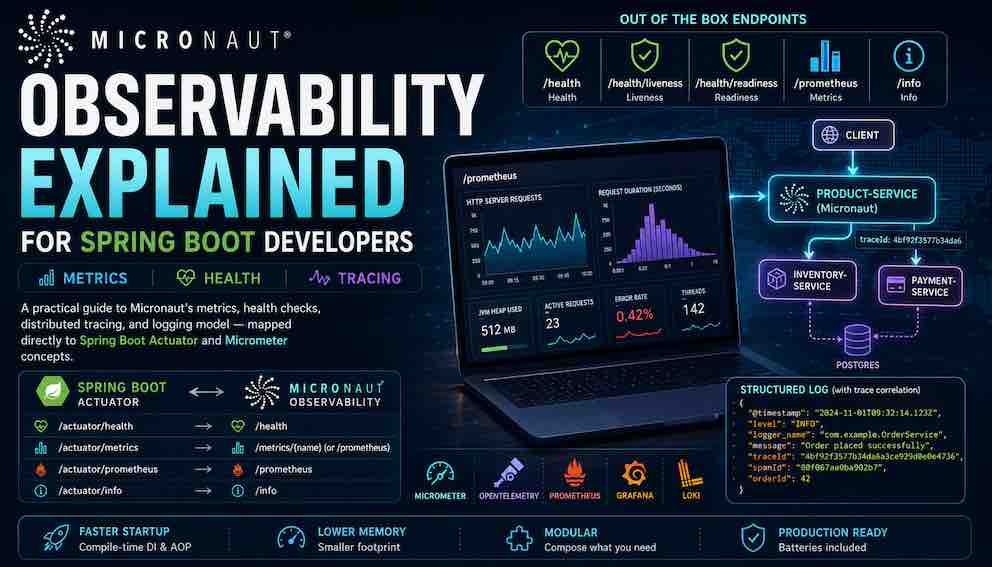
Observability in microservices means being able to answer three questions at any point in production: is the service healthy, how has it been performing, and what exactly happened for a specific request. This article walks through how Micronaut addresses all four observability pillars — health checks, metrics, distributed tracing, and structured logging — with working configuration and code examples throughout. Unlike Spring Boot, which wires observability at runtime through reflection, Micronaut instruments everything at compile time using annotation processing and bean introspection, resulting in faster startup, lower memory overhead, and no runtime surprises from missing auto-configuration. The APIs will feel familiar to any Spring Boot developer — Micrometer, OpenTelemetry, and Logback are the same tools, just assembled differently.
What This Article Covers
This article walks through the four core observability pillars — health checks, metrics, distributed tracing, and structured logging — explaining what each concept means, how Micronaut implements it, and how that compares to Spring Boot. You will learn enough to add production-ready observability to a Micronaut service, with configuration examples and working code throughout.
A fifth concern, alerting, is also part of a complete observability setup — defining rules that fire when a metric crosses a threshold. It lives in the metrics backend(datadog, aws cloudwatch etc) rather than in your application code, so it is out of scope here.
How Micronaut's Observability Differs from Spring Boot
Spring Boot Actuator is a single unified subsystem: add one starter, expose endpoints, and everything works. Micronaut takes a different approach — observability is composed of separate modules you assemble yourself. This means you include only what you need, and each piece can be configured independently.
The modules used in this article are:
- micronaut-management — health checks and the /info endpoint
- Micrometer integrations — metrics collection and Prometheus export
- OpenTelemetry integration — distributed tracing
Spring Boot auto-configures most observability features at runtime using reflection. Micronaut wires everything at compile time through annotation processing and bean introspection. The practical result is faster startup and a smaller memory footprint — but the configuration and APIs remain familiar if you already know Micrometer.
Before diving in: three terms appear throughout this article and are worth defining upfront. Micrometer is the instrumentation API inside your application — the Counter, Timer, and MeterRegistry you write code against. Prometheus is one of several metrics backends that scrapes your /prometheus endpoint and stores the numbers for querying; others include Datadog, CloudWatch, and InfluxDB. OpenTelemetry is the industry standard for distributed tracing — it defines how traces are created and propagated across services, and Micronaut uses it natively.
Dependencies
Add these to build.gradle. The rest of the article is structured around what each one gives you:
Part One: Health Checks
What Health Checks Are and Why You Need Them
A health check is an endpoint your infrastructure queries to find out whether your application is in a usable state. The simplest possible health check just returns HTTP 200 if the process is alive. Useful health checks also verify that critical dependencies — the database, the message broker, a downstream payment gateway — are reachable and responding.
In containerised deployments, an orchestrator like Kubernetes uses health checks to make two separate decisions. The first is whether to restart a service instance — answered by the liveness endpoint. The second is whether to send traffic to a service instance — answered by the readiness endpoint. Treating these as the same check is a common mistake: if you use a database health check for both, a temporary database outage triggers a restart of every instance, even though the instances themselves are fine.
What Micronaut Gives You Out of the Box
Adding micronaut-management enables three endpoints immediately with no additional code:
- /health — returns the aggregate status of all registered health indicators. Returns HTTP 200 if everything is UP, HTTP 503 if anything is DOWN.
- /health/liveness — a lightweight check that answers "is this process alive and running?" Used to detect unrecoverable failures that warrant a restart.
- /health/readiness — a fuller check that answers "is this application ready to accept traffic?" Used to detect when dependencies like databases or brokers are unavailable.
The following indicators activate automatically when the relevant dependency is on the classpath:
DependencyWhat is checked
micronaut-jdbc-hikari
Acquires a connection and runs a probe query
micronaut-kafka
Checks broker connectivity
micronaut-rabbitmq
Checks the AMQP connection
micronaut-redis-lettuce
Sends a Redis PING
(always active)
Disk free space above a configurable threshold
A sample /health response:
Configuring Health Endpoints
Production note: sensitive: false exposes full details without authentication. In production, either set sensitive: true and add authentication, or expose management endpoints on a separate network port that your orchestrator can reach but external clients cannot. Many teams also set details-visible: NEVER so the aggregate status is visible but individual component details are not.
Liveness vs. Readiness Probes
Micronaut splits health checks into two endpoints with distinct purposes:
- /health/liveness — is the process itself healthy? Fails only for unrecoverable conditions like a deadlocked thread pool. A database being temporarily down is not a liveness failure.
- /health/readiness — is the application ready to accept traffic? Fails when external dependencies (database, broker, cache) are unreachable.
The distinction matters when something like Kubernetes consumes these endpoints. Kubernetes checks liveness to decide whether to restart a pod, and readiness to decide whether to route traffic to it. Conflating the two causes unnecessary restarts during a dependency outage — the pod is fine, just its dependency isn't.
Use @Liveness or @Readiness on any custom health indicator to control which endpoint it contributes to:
Writing a Custom Health Indicator
Suppose your service depends on a payment gateway. You want /health/readiness to return DOWN when that gateway is unreachable, so traffic stops routing to this instance until it recovers.
Implement HealthIndicator from io.micronaut.health. The interface returns a reactive Publisher<HealthResult>, which allows the check to run without blocking Micronaut's event loop:
The @Readiness annotation ensures this indicator only contributes to /health/readiness. If the payment gateway fails, readiness fails but liveness remains healthy — no unnecessary restarts. The string "payment-gateway" becomes the key under which this result appears in the response body.
Blocking vs. non-blocking: Mono.fromCallable wraps a blocking call, which is fine for a synchronous client. If your client exposes a reactive API, prefer Mono.from(paymentGatewayClient.pingReactive()) to avoid occupying an event loop thread while the network call completes.
The /info Endpoint
The /info endpoint exposes static metadata about your application — version numbers, build information, environment identifiers. Unlike health checks, which change at runtime, /info returns the same data until the application is redeployed.
The @project.version@ placeholder is resolved at build time by both the Micronaut Gradle plugin and Maven through resource filtering — the same pattern Spring Boot uses.
Comparison to Spring Boot
In Spring Boot Actuator, you implement HealthIndicator from org.springframework.boot.actuate.health and return a Health object. To assign an indicator to liveness or readiness, you configure management.endpoint.health.group.liveness.include in application.properties. Micronaut's @Liveness and @Readiness annotations on the indicator class itself are simpler for the common case.
Spring Boot health indicators are typically blocking. Micronaut's Publisher<HealthResult> return type aligns with its non-blocking architecture and works naturally with reactive clients.
Endpoint paths differ: Spring Boot uses /actuator/health; Micronaut uses /health.
Part Two: Metrics
What Metrics Are and Why You Collect Them
A metric is a named, timestamped number. It answers questions about your application's behaviour over time: how many orders were placed in the last five minutes, what is the 99th-percentile latency of the checkout endpoint, how many database connections are currently active.
Unlike health checks — which tell you whether the service is up right now — metrics tell you how it has been performing over time. You query metrics to spot trends: error rates increasing gradually before a failure, latency spiking at certain times of day, memory usage growing slowly until a crash.
In a production system, you typically send metrics to a time-series database like Prometheus, then visualise them in Grafana dashboards and configure alerts that fire when a metric crosses a threshold.
What Micronaut Gives You Out of the Box
Adding the Micrometer dependencies enables automatic collection of a wide range of metrics with no instrumentation code required:
- JVM — heap and non-heap memory, GC pause times, thread counts, class loading
- HTTP server — request count, latency histograms, and active requests tagged by URI, method, and status
- HTTP client — outbound request count and latency
- Executor — thread pool sizes and queue depths for Micronaut's internal executors
- Datasource — HikariCP pool connections, pending acquisitions, and connection creation time
- Kafka — producer and consumer metrics when micronaut-kafka is on the classpath
Most of the metrics you would have wired up manually in a Spring Boot service simply appear.
Understanding Micrometer and Prometheus
Two distinct layers are involved, and it helps to keep them separate. Micrometer is the instrumentation layer inside your application — the vendor-neutral API you write against: Counter, Timer, Gauge, MeterRegistry. None of that code mentions any specific backend. The registry is the backend that scrapes, stores, and queries what Micrometer produces. Micronaut supports Prometheus, Datadog, CloudWatch, InfluxDB, Dynatrace, and others through swappable registry dependencies. Switching backends means changing one dependency and a few lines of application.yml — every Counter, Timer, and Gauge in your code stays identical.
This article uses Prometheus because it is open source and the most widely used option in the Java ecosystem. Prometheus works by pulling — scraping your /prometheus endpoint on a regular interval — rather than your application pushing data to it.
Understanding Micrometer's Meter Types
Before writing custom metrics, it helps to know the four fundamental meter types:
Counter — a number that only ever increases. Use it to count occurrences: orders placed, emails sent, errors thrown. In Prometheus you query its rate of change — rate(orders_placed_total[5m]) — not the raw value.
Timer — measures how long something takes and counts how many times it happened. Records a count, a duration sum, and optionally histogram buckets for percentile calculations. Use it whenever you care about latency.
Gauge — reflects a current value that can go up and down: queue depth, active connections, cache size. Re-read on every scrape, so it naturally represents fluctuating values.
Distribution Summary — like a timer but for arbitrary values rather than durations. Use it for request payload sizes or batch sizes.
Configuring the Prometheus Endpoint
What step controls: This is not a hint to Prometheus about scrape frequency. It defines the interval at which Micronaut pre-computes rate aggregations for counters. It should match your Prometheus scrape interval — mismatches cause under- or over-counting in rate() queries.
When you hit /prometheus in a browser or with curl, you will see plain text output like this:
Each line is one data point. The # HELP line is a human-readable description of the metric. The # TYPE line tells Prometheus what kind of meter it is. The data lines follow the pattern metric_name{tags} value — so the example above is saying: for GET requests to /products that returned HTTP 200 with no exception, there have been 142 requests totalling 3.847 seconds of processing time. Prometheus scrapes this endpoint, stores the numbers, and makes them queryable. You would never read this output directly — it is intended to be consumed by Prometheus, not humans.
Writing Custom Metrics
A clean pattern is to keep metric registration in a dedicated class, separate from your business logic. OrderService processes orders; OrderMetrics owns the meters. This gives each class a single responsibility and makes both easier to test independently.
OrderMetrics registers all meters and exposes simple methods the service calls:
OrderService contains only business logic and has no Micrometer imports:
A Note on Tag Cardinality
Tags let you slice metrics in queries — for example, filtering orders.placed by currency or result. Each unique combination of tag values creates a separate time series in Prometheus. Never use unbounded values like user IDs or order IDs as tag values — each new value creates a new time series, and your metrics registry will grow without bound:
Comparison to Spring Boot
The Micrometer API is identical in both frameworks — Counter.builder(), Timer.builder(), and MeterRegistry come from the same library. The only code difference is @Inject instead of @Autowired.
The larger difference is in what is automatic. Spring Boot requires you to opt into specific auto-configurations. Micronaut enables most metrics by default when the dependencies are present.
The Prometheus endpoint path also differs: Spring Boot exposes it at /actuator/prometheus; Micronaut exposes it at /prometheus.
Part Three: Distributed Tracing
What Distributed Tracing Is and When You Need It
When a user clicks "place order", the request might pass through an API gateway, an order service, an inventory service, a payment service, and a notification service before a response is sent back. If that request takes three seconds and you want to know why, metrics and logs alone will not give you a clear answer.
Distributed tracing solves this by assigning every request a unique trace ID at the entry point. Every service that handles the request records a span — a named, timed unit of work with a start time, a duration, and any relevant attributes. All spans sharing the same trace ID are assembled into a tree:
OpenTelemetry is the current industry standard for distributed tracing. It is vendor-neutral — the same instrumentation code can send traces to Jaeger, Grafana Tempo, Zipkin, Datadog, Honeycomb, or any other backend that speaks the OTLP protocol. Micronaut uses OpenTelemetry natively. Earlier versions used Zipkin and Jaeger-specific clients directly; those approaches are now superseded.
What Micronaut Gives You Out of the Box
With the OpenTelemetry dependencies on the classpath, Micronaut automatically:
- Creates a root span for every incoming HTTP request, recording HTTP method, URI, status code, and any exception type
- Creates a child span for every outgoing HTTP client call and propagates the trace ID via W3C traceparent headers — so the downstream service continues the same trace automatically
- Instruments Micronaut Data queries as spans when using the data module
With no additional instrumentation, a request produces a trace like this:
Configuring the OpenTelemetry Exporter
The exporter is responsible for sending the spans your application produces to a tracing backend — Jaeger, Grafana Tempo, Datadog, or anything else that speaks OTLP. This configuration tells Micronaut where to send them, how many to send, and how to identify this service in the backend.
OTLP supports two transports: gRPC on port 4317 and HTTP/protobuf on port 4318. Most modern backends accept both; HTTP/protobuf is often simpler behind corporate firewalls. A sampling probability of 1.0 traces every request — fine for development but expensive in production. Configure it via an environment variable so you can change it without redeploying.
Adding Custom Spans with @NewSpan and @SpanTag
Micronaut automatically traces HTTP requests and database queries, but it has no way of knowing what your business logic is doing. @NewSpan lets you mark any method as a named span so it appears in the trace, giving you visibility into the operations that matter most to your application.
@NewSpan creates a span that starts when the method begins and ends when it returns or throws. @SpanTag records the parameter value as a searchable attribute on the span — in Jaeger or Grafana Tempo you can filter all traces where order.customerId equals a specific value.
Comparison to Spring Boot
Spring Boot has gone through several tracing implementations: Spring Cloud Sleuth with Brave, then Micrometer Tracing, and now OpenTelemetry natively in Spring Boot 3.x. Micronaut uses OpenTelemetry natively from the start with just the two dependencies shown above.
The annotation names are the same in both frameworks — @NewSpan and @SpanTag work identically. If you have used them in Spring Boot, you already know how to use them in Micronaut.
Part Four: Structured Logging
Why Structured Logging Matters
Plain text log lines like 2024-11-01 INFO Order placed: 42 are written for humans reading a terminal. They are difficult to query programmatically, require fragile regex parsing to extract fields, and cannot be reliably joined with traces or metrics.
Structured logging emits each log line as a JSON object with consistent, named fields that log aggregation platforms (Loki, CloudWatch Logs, Elasticsearch) can index and filter without any parsing configuration:
The traceId and spanId fields are the connection to distributed tracing. In Grafana you can click a traceId in a log line and jump directly to the corresponding trace in Tempo, or start from a metric spike and navigate to the traces and log lines that were active at that moment.
Configuring the Logstash JSON Encoder
Micronaut uses Logback as its logging framework. By default, Logback outputs plain text. Swapping in the Logstash encoder tells Logback to output JSON instead — the format shown above. This is done through a logback.xml configuration file that you place in src/main/resources.
The configuration has three parts. The appender defines where log output goes (standard output in this case, which in a containerised environment is captured and forwarded to your log aggregation system) and how it is formatted (JSON via LogstashEncoder). The root logger sets the default log level to INFO and wires it to the appender. The two logger entries suppress noisy framework logs from Micronaut and Netty — without these, your logs would be flooded with internal framework messages that are rarely useful in production.
Create src/main/resources/logback.xml:
When OpenTelemetry tracing is active, traceId and spanId are injected into every log line automatically — no extra configuration needed.
Adding Request-Scoped Context with MDC
The Logstash encoder and OpenTelemetry together give you traceId and spanId in every log line automatically. But sometimes you need additional fields that are specific to an individual request — a correlation ID passed in from an API gateway, or the HTTP method and path — and you want those fields to appear in every log line produced during that request without threading them manually through every method call.
That is what the MDC (Mapped Diagnostic Context) is for. It is a map that Logback automatically includes in every log line produced on the current thread. You populate it once when the request arrives, and it travels with every log statement until the request completes. This is particularly useful when your services are called from a frontend or API gateway that generates a correlation ID — by propagating that ID through the MDC, you can filter logs across multiple services for a single user journey even without a full tracing setup.
Use an HTTP server filter to populate the MDC at the entry point:
Every log line emitted during this request will now include correlationId, method, and path fields. This is particularly useful when a correlation ID is passed in from a client or API gateway, allowing you to trace a single user journey across multiple services using logs alone.
Comparison to Spring Boot
Structured logging configuration is identical in both frameworks — the same logback.xml works in either without modification. MDC population via a filter also works the same way.
The difference is trace ID injection. Spring Boot with Micrometer Tracing does inject trace IDs into logs, but requires additional bridge dependencies and configuration. Micronaut's OpenTelemetry integration includes log injection as a built-in feature — it works as soon as tracing is enabled.
Complete Configuration Reference
A consolidated application.yml with all four pillars enabled:
Testing Observability Components
Testing Health Indicators
Health indicators return a reactive Publisher. In tests, use Mono.from(...).block() to resolve the result synchronously:
Testing Metrics
Since meters are registered in OrderMetrics, that is the class to test directly. Inject it alongside a real MeterRegistry and assert that the expected meters are incremented:
Testing Distributed Tracing
Replace the OTLP exporter with an in-memory one that captures finished spans without needing a running Jaeger or Tempo instance.
Add the testing artifact:
Register a test factory:
Assert on the captured spans:
Quick Reference: Spring Boot Actuator to Micronaut
Endpoints
- Health: /actuator/health → /health
- Metrics: /actuator/prometheus → /prometheus
- Info: /actuator/info → /info
Health checks
- The HealthIndicator interface has the same name in both frameworks — the package changes from org.springframework.boot.actuate.health to io.micronaut.health.
- Assigning an indicator to liveness or readiness changes from management.endpoint.health.group.liveness.include in application.properties to placing @Liveness or @Readiness directly on the indicator class.
Metrics
- @Autowired MeterRegistry → @Inject MeterRegistry. Everything else — Counter.builder(), Timer.builder(), @Timed — is identical, coming from the same Micrometer library.
Distributed tracing
- @NewSpan and @SpanTag have the same names and behaviour in both frameworks. The underlying implementation changes from Brave to OpenTelemetry, but your code does not need to.
- Test span capture changes from TestSpanHandler (Brave) to InMemorySpanExporter (OpenTelemetry).
Structured logging
- The Logstash encoder, logback.xml configuration, and MDC usage are identical in both frameworks — the same files work without modification.
About N Sharma
Lead Architect at StackAndSystemN Sharma is a technologist with over 28 years of experience in software engineering, system architecture, and technology consulting. He holds a Bachelor’s degree in Engineering, a DBF, and an MBA. His work focuses on research-driven technology education—explaining software architecture, system design, and development practices through structured tutorials designed to help engineers build reliable, scalable systems.
Disclaimer
This article is for educational purposes only. Assistance from AI-powered generative tools was taken to format and improve language flow. While we strive for accuracy, this content may contain errors or omissions and should be independently verified.